

Gauge
HVAC website template
A done-for-you HVAC business website built to book emergency calls and same-day repairs, with a call button that stays on screen, an HVAC-shaped quote form, and a built-in Lead Inbox.
Free to build and publish, no card required. $29 a month puts it on your own domain, with the domain included.
- A call button that stays on screen on phones
- A request form built for heating and cooling
- A seasonal tune-up section
- An email for every new request
- The Lead Inbox, from new to booked
- Financing and the brands you install
- A maintenance plan section
- Change any word or photo by tapping it

HVAC design
Gauge
An instrument-panel layout: light headlines against monospace readouts and hairline rules. For a shop that sells on diagnostics and precision.
- A request form built for HVAC
- A call button that stays on screen
- Seasonal tune-ups and an emergency band
- An email for every request
- The Lead Inbox
- Your services, with prices if you want them
Done for you
We'll build your HVAC website before the next heatwave.
2 business days, not a slow quarter. Live before the first no-cool call of the season.
$99 today, $400 on approval, then $79/month starting 30 days after go-live. 30-day money-back guarantee from the day it goes live, no reason needed, and you keep the domain. Registration and the first year are included.
Rather build it yourself? Start free. Either way you end up in the same editor, with the same Lead Inbox; done for you means the first version is built for you, and we keep changing it on the $79/month managed plan.
-
July and January pay for the rest of the year.
The site has an emergency line for the no-heat and no-cool calls, and a maintenance plan section for the months between, so the phone does not go silent in April.
-
Maintenance plans are where the margin is.
The plan gets a section of its own, with your price and what it covers, not a line buried in a services list. You tell us the terms; we make it the easiest thing on the site to say yes to.
-
Homeowners want a license number, not a slogan.
License, insurance and the brands you install sit near the top, where a nervous homeowner looks for them before calling anyone.
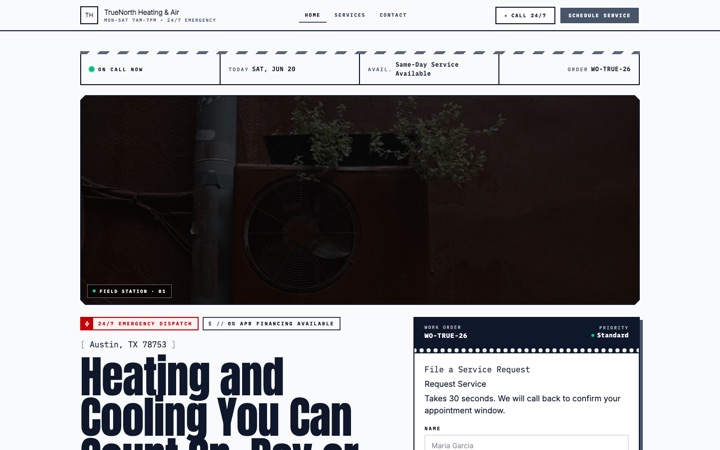
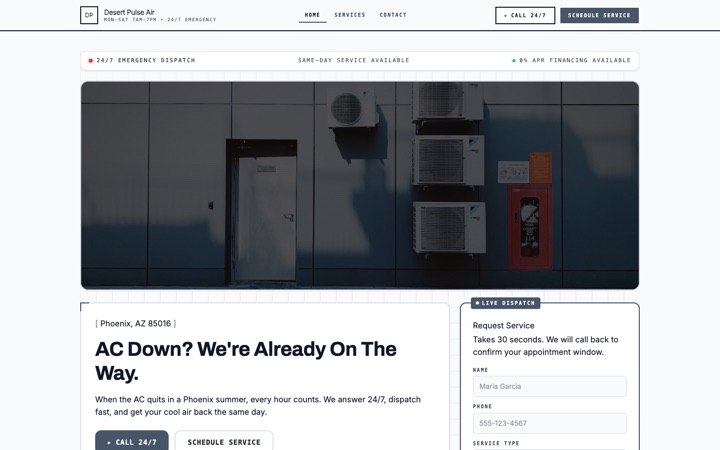
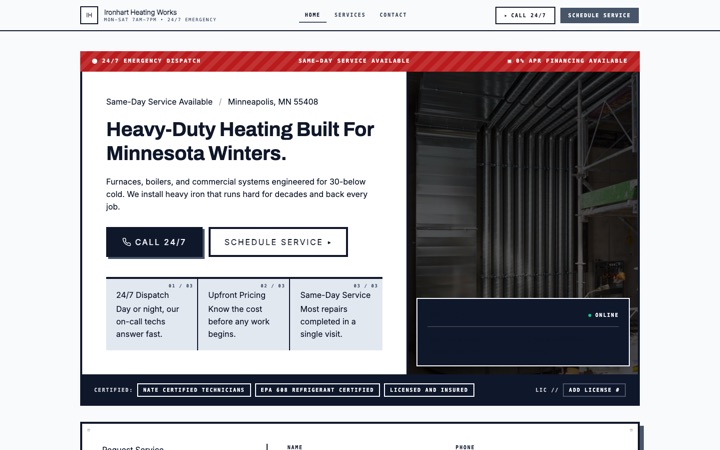
Four HVAC website templates. One editor.
Every design below is a complete HVAC website in its own right, not a color swap. Open any of them as a full live site, then switch between them later without losing a word you have written.
-
-
-
-
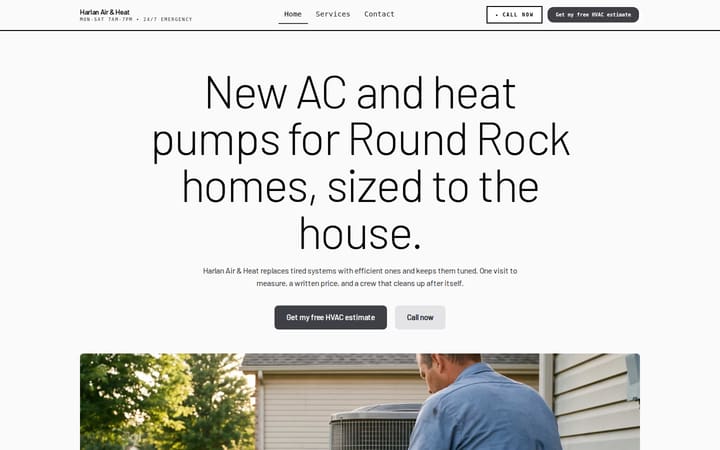


The HVAC website built to catch the call when the AC dies
An HVAC website with a request form that asks what's wrong and how urgent it is, a call button that stays on screen on phones, an email for every request, and a Lead Inbox to track each one from new to booked. Free to build and preview, with nothing to install.
Built for solo HVAC techs, two-truck residential outfits, full-service heating and cooling companies, commercial HVAC contractors, install and replacement specialists, indoor air quality pros, and emergency dispatch teams. Every section, form field and button is shaped around the way HVAC customers decide who to call when the system stops working.
- Free to build and preview
- A call button that stays on screen
- Every request in your email and Lead Inbox
- Built for phones first
Built for HVAC. Built to book the job.
Plenty of HVAC websites bury the phone number in a header and hope. This one was designed around two real people: the homeowner sweating in a 90-degree house at 9pm tapping the first three Google results, and the dispatcher juggling a full board of techs who can't sit at a laptop replying to inquiries between calls.
Requests that say what's wrong
Dispatch, Signal and Ironclad open with a request form that asks what's going on (AC not cooling, no heat, a noise or smell, a new system), whether it's an emergency or a booked visit, the system type, its age and the kind of property. You know the job before you call back.
A call button that stays on screen
On phones, a call button sits at the bottom of every screen as the visitor scrolls, with a text button beside it if you want one. When someone is worried about a broken furnace in January, calling you is always one thumb-tap away.
Every request comes to your email
When someone sends the form, you get an email with every answer they gave, and you can reply straight to them. You don't have to log in to read it, and there's no app to install.
Every lead saved inside Buildrok
The same request lands in your Lead Inbox. Move it from new to contacted, quoted, booked or lost, set a priority, add private notes, and export the list to CSV. It's a simple way for a busy HVAC outfit to see what's waiting.
Looks like a real HVAC company, not a DIY site
Four designs built for heating and cooling work, Dispatch, Signal, Ironclad and Gauge, each with its own type and layout, HVAC photography to start from until you add your own, and a credentials strip for your license number and insurance. It's built to earn the click on a Google search and the call on the page.
Local search basics built in
Your business details are marked up for Google as a local business, each page has a title and description you can edit, and the towns you cover are listed on the page and on your areas page. Showing up for 'AC repair in [your city]' also takes reviews and a Google Business Profile, which are yours to look after.
Everything an HVAC business actually needs
Not a kitchen sink of features you will never use. The sections and tools that turn HVAC website visitors into repair calls and install estimates, each one checked against what the template really does.
A request form built for HVAC
Dispatch, Signal and Ironclad open with a request form that asks what's going on, whether it's an emergency, a booked visit, a replacement quote or a maintenance plan, the system type, its age and the property. Every label and option is yours to edit, and every design also has a quote form further down the page.
A call button that stays on screen
On phones, a call button and a text button sit at the bottom of every screen with your number behind them. Turn either one off if you'd rather. It's the shortest path from 'my AC just died' to your phone ringing.
Seasonal tune-ups and an emergency band
A seasonal section with a card for each season, from spring AC prep to the winter heat check, and an emergency band on your services page you can switch on. The words on each are yours, and nothing about after-hours service publishes until you write it.
An email for every request
The email carries the name, the phone number and every answer from the form, so you can call back from the truck. Reply from your phone. There's no app to install and no login to see it.
The Lead Inbox
Every request is saved in your Buildrok dashboard. Move it through new, contacted, quoted, booked and lost, set a priority, keep private notes, search by name, phone or address, and export to CSV. Requests nobody has answered yet are flagged so they don't sit.
Your services, with prices if you want them
List every job you do, from AC repair to mini-splits, each with a description and, if you want to show one, a price. Each service can also have a page of its own, which helps it show up when someone searches for that job.
Financing, rebates and the brands you service
A financing and rebates section for the payment options you actually offer, and a row for the equipment brands you work on. Nothing about financing publishes until you write it, so the site never promises a rate you don't have.
The towns you cover
List every town and suburb your trucks cover on the home page and on your areas page, and give your main city a page of its own. Customers can see they're inside your service area before they fill in the form.
Credentials, reviews and a maintenance plan
A credentials strip for your license number, insurance, years in business and how far you travel, reviews you add or bring in from Google, and a section for selling your maintenance plan, with its price and what it includes.
Edit anything on the page
Tap any heading, paragraph, photo, price, service or button to change it. Pick a color preset or use your own colors, and switch between Dispatch, Signal, Ironclad and Gauge without losing your words. No plugins, no developer.
From template to booked calls in three steps
-
Pick the HVAC template
Click 'Preview my HVAC site free'. Your site opens with sample services, a working request form, the call button and the Dispatch design already in place.
-
Make it yours, live
Add your business name, services, phone number, financing options, service areas and contact details. Tap anything on the page to change it, and every change saves as you go.
-
Go live and catch every request
Publish it. From then on every request from the form lands in your email and your Buildrok Lead Inbox, and the call button rings your phone. Put it on your own domain when you're ready: a new one registered in your name, or connect one you already own.
The lead system that ships with every HVAC site
A good-looking website is no use at 11pm on a 95-degree night if nobody gets the request. Here is what happens when a worried homeowner finds your site and taps the call button or sends the form.
-
Customer calls or fills in the request form
The call button stays on screen on phones and rings you directly. On Dispatch, Signal and Ironclad the request form opens the page and asks what's wrong, how urgent it is, the system and the property; a quote form further down catches everyone else.
-
You get an email
When they press send, an email arrives with every answer they gave, so you have what you need to send a tech. No app, no login.
-
The lead is filed in your Buildrok inbox
At the same time, the request appears in your Lead Inbox, where you move it from new to contacted, quoted, booked or lost, set a priority, keep notes for the tech, and export to CSV whenever you like.
-
You call back knowing the job
You know the system, the symptom and whether it's an emergency before you dial, so the first call is about when you can get there rather than twenty questions. The template is built to make that call the easiest thing you do all day.
Show customers exactly what you service
List every service you offer, and each one can have a page of its own as well. Customers pick out the job they need before they fill in the form, so the request arrives already sorted and the intake call is shorter.
- Emergency and after-hours calls
- AC repair and diagnostics
- Furnace repair and diagnostics
- System install and replacement
- Annual tune-ups and maintenance plans
- Ductwork cleaning and repair
- Indoor air quality and filtration
- Heat pump install and service
- Mini-split and ductless systems
- Thermostat and smart controls
- Commercial HVAC service
- Refrigerant recharge and leak repair
Reasons customers pick you over the cheapest tech
HVAC is high-stakes. A bad install costs thousands, and a no-show on a freezing night loses the customer. The template gives you a place for each of these, so you can show why you're worth the call before they pick up the phone. Each one appears once you fill it in.
- Your license number, in the credentials strip
- Your insurance, in your own words
- Years in business, counted from the year you started
- How far your trucks travel
- The equipment brands you work on
- Your technicians and their certifications, such as NATE, on the about page
- Financing and rebates, if you offer them
- Your maintenance plan and what it includes
- Reviews you add, or bring in from Google
- A price on each service, if you want to show one
Stop losing emergency calls to faster shops
Somebody near you is searching for AC repair right now, probably in a hot house with a dead unit. Give them a site that asks what's wrong, keeps your number on screen, and puts the request in your email and your Lead Inbox before your competitor calls them back.
What it costs
$29 a month
Or $276 a year, which is $23 a month. Building and previewing are free, with no card.
- Every page your design has, plus up to 5 of your own
- A standard .com, .net, .org, .co, .us domain, registered in your name and renewed while you're subscribed
- Or connect a domain you already own, free
- Hosting and the security padlock
- A quote form built for your trade, with junk and bot messages blocked
- The Lead Inbox, to track every job from new to booked
- A photo gallery of your work
- A call button that stays on screen on phones
- Built for local Google searches
Gauge template questions
Is this HVAC website template really free to preview?
Yes. You can preview the full HVAC template, edit your business name, services, phone number, financing options and content, and share a preview link without entering any payment details. You only pay when you put it on your own domain.
How fast can I get my HVAC website live?
The same day, if you build it yourself. Pick a design, tap any text or photo to change it, add your services and phone number, then publish. How long it takes depends on how much you want to write. There's no code, no plugins and no developer.
Does the HVAC template handle emergency 24/7 calls?
It gives emergencies a fast route to you. A call button stays on screen on phones, the request form on Dispatch, Signal and Ironclad asks whether it's an emergency, and your services page has an emergency band you can switch on. Whether you answer around the clock is your call: the site only says you're on call 24/7 once you write it in.
Does the HVAC template include a quote form?
Yes. Dispatch, Signal and Ironclad open with a request form that asks what's wrong (AC not cooling, no heat, a noise or smell, a new system), whether it's an emergency, a booked visit, a replacement quote or a maintenance plan, the system type, its age and the property. Every design also has a quote form further down the page. You can change every label and option.
Where do my HVAC leads go when someone fills out the form or hits the call bar?
A form request goes two places at once: an email to you with every answer, and your Buildrok Lead Inbox, where you move it through new, contacted, quoted, booked or lost. A tap on the call button simply rings your phone. The Lead Inbox flags requests nobody has answered yet, so an emergency doesn't sit.
What is the Buildrok Lead Inbox?
A simple place to track the jobs that come in from your site. Every request lands in one list. You move each one from new to contacted, quoted, booked or lost, set a priority, add private notes, search by name, phone or address, filter by status, site or source, and export to CSV any time. It comes with the plan, with no spreadsheet and no extra subscription.
Will my HVAC website rank on Google?
It's built for local Google searches from the start: your business is marked up as a local business, each page has a title and description you can edit, and the towns you cover are on the page and on your areas page. A site shows up in Google once it's on your own domain. Ranking for 'AC repair in [your city]' or 'emergency furnace repair near me' also takes reviews and a Google Business Profile, which are yours to look after.
Can I display NATE, EPA, and manufacturer badges?
You can name them. The credentials strip has rows for your license number, insurance, years in business and how far you travel, the brands you work on get a row of their own, and the about page has room for each technician's certifications, NATE and EPA 608 included. There's no badge or logo upload, so they appear as text.
Can I show financing options on the site?
Yes. There's a financing and rebates section with its own heading, details and button, for the payment options you offer. Pair it with your install and replacement service. Nothing about financing publishes until you write it in, so the site never promises a rate you don't have.
Is the HVAC template mobile-friendly?
Yes. It's built for phones first, with a call button that stays on screen and forms sized for a thumb. The hero film doesn't load on phones, so the first screen shows a still photo instead. It's designed for the phone a homeowner might be holding in front of a broken system.
Can I use this template if I do commercial HVAC, not residential?
Yes. It works for residential and light commercial work, full commercial contractors, install and replacement specialists, indoor air quality pros and solo techs. There's a commercial section with its own inquiry form for service contracts, the request form has a commercial property option, and the services, form options and credentials are all yours to change.
Can I rank in more than one city or service area?
Yes, with one condition. Every plan has an areas page that lists every town, suburb or zip code you cover, and a page of its own for your main city. More town pages, one for each place you want to target beyond your home base, come with the Local SEO Pro add-on.
How much does the HVAC website cost after the free preview?
One plan, $29 a month or $276 a year. It includes every page this design has (home, services, contact, about, FAQ and gallery, plus a page for each service), up to 5 pages of your own, your areas page, hosting and the security padlock. A new domain (.com, .net, .org, .co, .us) is registered in your name while you're subscribed, or you can connect one you already own for free. Cancel any time.
Every service business template
Designs built for plumbers, cleaners, electricians, movers, barbers and more.
- Cleaning website template
- Mobile detailing website template
- Landscaping website template
- HVAC website template
- Contractor website template
- Food truck website template
- Moving company website template
- Barber shop website template
- Electrician website template
- Plumber website template
- Premium cleaning website template
- Modern cleaning website template
- Cleaning website template house notes
- Premium moving company website template
- Mobile notary website template
- Roofing website template
- Cottage food bakery website template
- Mobile detailing website template window sticker
- Cottage food bakery website template linen
- Cottage food bakery website template pantry
- Cottage food bakery website template rise
- Mobile detailing website template chrome
Your HVAC website, live today.
Pick a design, change anything you want, and publish when it's right. Free to build and preview with no card. The plan is $29 a month once it's on your own domain, and you can cancel any time.