

Pantry
Home bakery and cottage food website template
A done-for-you cottage food website template where the menu is the order form, with delivery days and zones, a daily baking cap, and itemized orders straight to your inbox.
Free to build and publish, no card required. $29 a month puts it on your own domain, with the domain included.
- The menu is the order form, no second list
- Delivery days, zones and fees by zip code
- A daily limit on new orders
- Order cutoffs and blackout dates
- Pickup always available, never zone-locked
- A cottage food disclosure built in
- An itemized order email, both ways
- Built for phones

Home kitchen design
Pantry
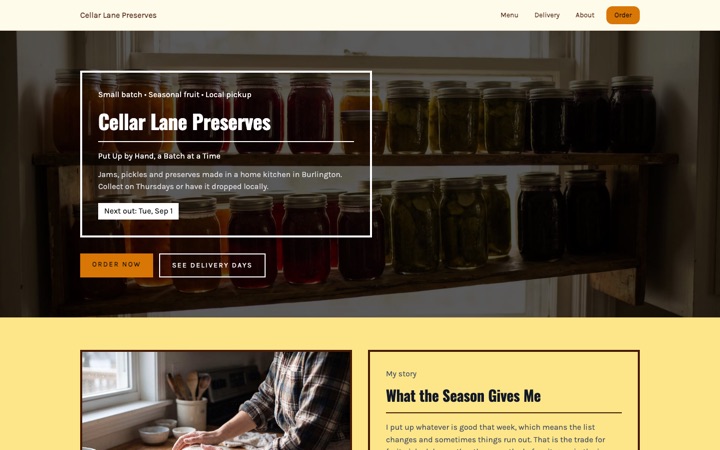
Built from: The printed label on a jar of preserves: a coloured band, the kitchen's name, and ruled rows for the product, the batch and the next pickup day.
Label and jar-tag styling, with pickup windows up front. Built for jams, preserves, sauces and market stock.
- An orderable menu with units and minimums
- A running total as they order
- Delivery zones by zip code
- Pickup that's never zone-locked
- A daily limit, counted your way
- Order cutoffs and blackout dates
Four home kitchen website templates. One editor.
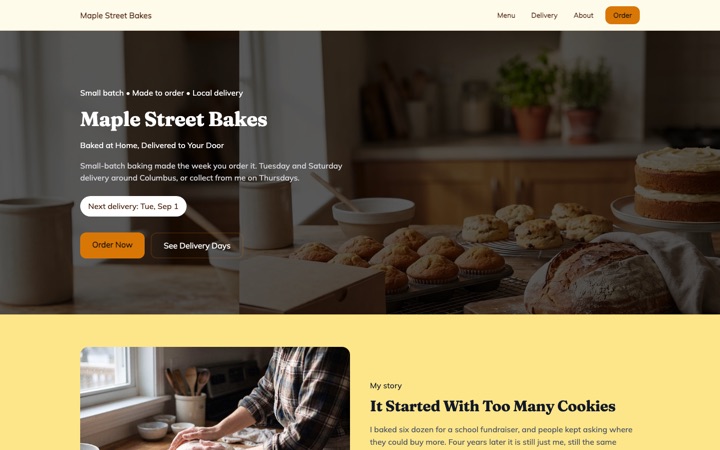
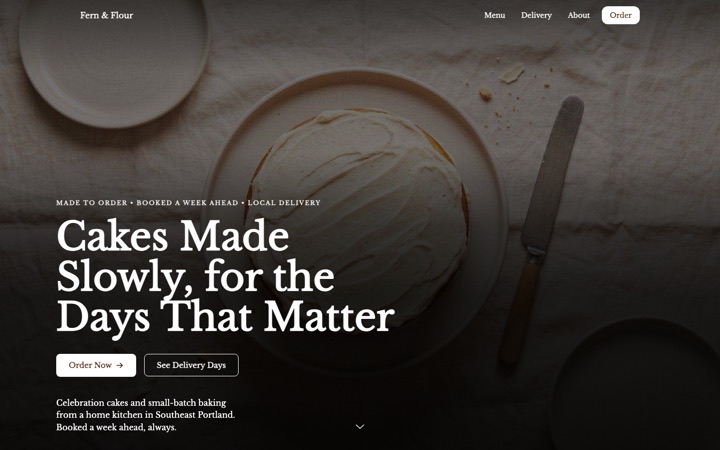
Every design below is a complete home kitchen website in its own right, not a color swap. Open any of them as a full live site, then switch between them later without losing a word you have written.
-
-
-
-
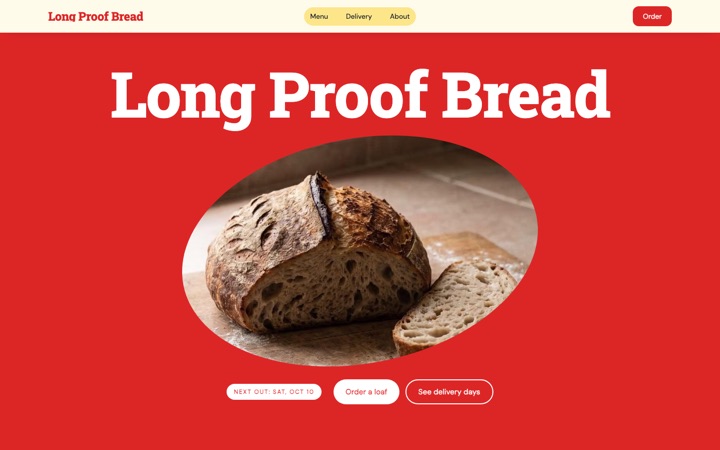


Live on Buildrok: Jewely's Chocolate Chip Cookies (Round Rock, TX)
Stop taking orders in Facebook comments
You're running a real business out of your kitchen, and a comment thread is your order system. Hearth gives you a menu customers can order from, delivery days and areas you set once, and a daily limit so a full day shows as fully booked. Free to build and preview.
Built for home bakers, cake decorators, candy makers, jam and pickle makers, and anyone else selling food from a home kitchen. Everything on the page comes from what you enter, so nothing on it assumes you sell cookies. What you may sell from home, and how, is set by your state; the site doesn't decide that for you.
- Free to build and preview
- No payment processing to set up
- Orders land in your email
- Laid out for the phone your customers order on
The admin is the job you didn't sign up for
Nobody starts baking because they love reconciling a comment thread against a notebook. Three things eat the evening: taking the order, working out whether you can get it to them, and finding out too late that Saturday is already full. Hearth answers all three on the page, before anyone sends you a message.
One menu, not two lists
Add an item to your menu and it's orderable, with its own price, unit and minimum order. There's no separate order form to keep in step, which is the thing that always drifts. Give an item a note, like 'custom cakes need five days', and it shows on the menu and in the order form.
They find out if you deliver, not you
Set your delivery days once, then add each area you cover with its zip codes and what you charge. A customer types their zip and sees right away whether you come to them and what it costs. If you don't, and you offer pickup, they're pointed to pickup instead of a dead end, which is how you keep the order rather than losing it to a shrug.
A limit, so a full Saturday shows as full
Set the most orders you'll take in a day, or a total in your own unit, like dozens or trays, or both. When a date reaches it, the date picker shows it as fully booked instead of quietly dropping it, so people see you're in demand and pick the next free day. It closes a day to new orders rather than acting as a hard stop: one order sent while the day was still open can take it past your number, and you can always decline it.
Notice, and days off
Tell it how much notice you need and it stops offering any date sooner. Block out holidays and the week you're away. The date picker only offers days you deliver or offer pickup, so nobody gets their hopes up for a day you can't do.
Your state's notice, filled in for you
Most states want food from a home kitchen to say so, and each words it differently. The site picks your state's wording from your business address, read from that state's own law, and shows it beside your menu, inside the order form and in the customer's confirmation email. You can change it, and checking it against your state's rules is still your job: the site shows the notice, it doesn't make you compliant.
You still take the money your way
This is request-to-order, not checkout. Customers ask, you confirm, and you take payment however you already do: cash, a card reader, Venmo, Zelle, whatever suits. List the ways you accept and they show on the page, and again in the email the customer gets when you confirm. Nothing to set up, no processing fees, and no marketplace taking a cut of a batch you baked.
Everything a home kitchen actually needs
Not a storefront with the food parts bolted on. The things that decide whether a Tuesday message becomes a Saturday order, and whether that Saturday is one you can actually survive.
An orderable menu with units and minimums
Each item carries its own price, unit and minimum: cookies by the dozen, bread by the loaf, cakes by the tier. An item that needs extra notice can say so in a note on the menu and in the order form.
A running total as they order
Customers add items at your quantities and minimums, and the total, delivery fee included, updates as they go. An item priced as 'ask' stays on the menu and out of the total rather than being counted as free.
Delivery zones by zip code
Add each area you cover with the zips it contains and the fee you charge. A customer types their zip and finds out straight away, before they've written a message you then have to answer with no.
Pickup that's never zone-locked
Pickup has its own days, spot and instructions, and anyone can choose it wherever they live. Someone outside every delivery zone is pointed to pickup instead of a dead end. The pickup spot you type is the only address the page shows; your business address never appears.
A daily limit, counted your way
Cap a day by number of orders, by a total you count in your own unit, like dozens or trays, or both. A full day shows as fully booked instead of vanishing, and the orders page totals each day against your limit.
Order cutoffs and blackout dates
Say how much notice you need and nothing sooner is offered. Block the holidays, the week you're away, and the Sunday you already promised to someone else.
Your state's cottage food notice, where it belongs
Shown beside the menu, inside the order form and in the confirmation email, in your state's wording, picked from your business address. In Nevada and Washington, where cottage food has to change hands in person, the order form is switched off on the published site and customers are asked to get in touch instead.
Itemized order emails, both directions
You get the order broken out line by line with the date, delivery or pickup, the address and the total. A customer who gives an email gets the same summary, with your state's notice and a line saying nothing has been charged yet, so there's no argument later about what was asked for.
Allergens, answered in your words
Say what's in each item in its description, and answer the allergy question in your FAQ yourself. The site never answers it for you: an example shows while you edit and stays off your published page until you've written your own.
Confirm or decline in one place
Every order lands in your Lead Inbox, where you confirm or decline it, with a message if you want one, and the customer is emailed your answer. An orders page groups what you're making by the day it's due.
Built for the phone it arrives on
A link in your Instagram bio or a Facebook post opens on a phone, so the menu, the zip check and the date picker are laid out for a thumb first and a laptop second.
From template to taking orders in three steps
-
Pick the home kitchen template
Click 'Preview Hearth free'. The site opens with an example menu, a working order form and the warm Hearth design in place. No card needed, and you can switch to Linen, Pantry and Rise any time.
-
Put your own menu in
Replace the example items with what you actually make. Set your delivery days, your zones and zips, your daily limit and how much notice you need. Tap any text to change it.
-
Publish and post the link
Go live on your own address and put the link in your Instagram bio and on your Facebook page. The next person who asks 'do you deliver to 78704' answers their own question.
What happens when somebody orders
This is the part a pretty menu page leaves out. An order that arrives as a comment under a photo is one you'll re-read four times and still get wrong. Here's the whole path from a customer tapping your link to you knowing exactly what to bake.
-
They build the order from the menu
They add items at your quantities and minimums. The running total is visible the whole way, so nobody is surprised by the number at the end.
-
They check their own zip
Delivery or pickup, and if delivery, whether you come to them and what it costs. If you don't, and you offer pickup, they're pointed to that rather than turned away.
-
They pick a date you can actually bake
The picker only offers dates that clear your notice period, aren't blacked out and still have room. A full Saturday reads as fully booked, which looks better than an empty calendar.
-
It lands in your inbox, itemized
You get the full order, the date, delivery or pickup and the address in one email, and the same order sits in your Buildrok Lead Inbox, where you confirm or decline it and the customer is emailed your answer. Nothing is lost between the message and the oven.
Whatever comes out of your kitchen
The menu is driven entirely by what you enter, so nothing on the page assumes you sell cookies. Here are some of the things a home kitchen might list, and each is just a menu item with its own price, unit and minimum. What you're allowed to sell from home is set by your state and varies a lot: some states only allow foods that keep without a fridge, others allow more. Check yours before you list it.
- Cakes and celebration cakes
- Cookies, brownies and bars
- Bread and sourdough
- Cupcakes and cake pops
- Pies and pastries
- Tamales and empanadas
- Weekly meal prep boxes
- Jams, preserves and pickles
- Candy, fudge and chocolate
- Granola, snacks and trail mix
- Home catering trays
- Seasonal and holiday pre-orders
Why somebody orders from a kitchen they haven't seen
Buying food from a stranger's home takes more trust than buying it from a shop, and the page has to earn that before anyone types their address. These are the things that do it, and each is something you fill in rather than a claim we make for you.
- Your state's cottage food notice, shown up front
- Your permit or registration number, if your state issues one
- Your story, and who's doing the baking
- Real photos of what you actually make
- Clear delivery areas and fees
- The notice you need, stated before anyone orders
- A written confirmation of every order
- Reviews from your customers, added by you
Your order system shouldn't be a comment thread
Somebody is scrolling your photos right now working out how to ask what a dozen costs and whether you come to their side of town. Give them a page that answers both and takes the order while they're still interested.
What it costs
$29 a month
Or $276 a year, which is $23 a month. Building and previewing are free, with no card.
- Every section your design has, on one page
- A standard .com, .net, .org, .co, .us domain, registered in your name and renewed while you're subscribed
- Or connect a domain you already own, free
- Hosting and the security padlock
- A quote form built for your trade, with junk and bot messages blocked
- The Lead Inbox, to track every job from new to booked
- A photo gallery of your work
- A call button that stays on screen on phones
- Built for local Google searches
Pantry template questions
Is this cottage food website template really free to preview?
Yes. Build the whole thing, put your real menu in, set your delivery zones and share a preview link, all without a card. You only pay when you want it live on your own web address: one plan, $29 a month.
Do I need to set up payments or a shopping cart?
No, and that's deliberate. This is request-to-order: the customer asks, you confirm, and you take the money however you already do, whether that's cash at pickup, a card reader or an app like Venmo or Zelle. List the ways you accept and they show on the page, and again in the email the customer gets when you confirm. There's nothing to set up, no processing fees and no percentage going to a marketplace.
How does the delivery zone check work?
You add each area you cover, the zip codes inside it, and what you charge to deliver there. A customer types their zip into the order form and sees right away whether you reach them and what it costs. If you don't cover them and you offer pickup, they're pointed to pickup instead of being turned away.
Can I stop people ordering more than I can bake?
Mostly, and here's exactly how. Set the most orders you'll take in a day, a total in your own unit like dozens or trays, or both. Once a date reaches your limit it shows as fully booked and can't be picked. It closes the day to new orders rather than acting as a hard stop, so one order sent while the day was still open can take it a little past your number, and you can decline it from your Lead Inbox. A full date stays visible, which reads as being in demand instead of being closed.
What about the cottage food disclosure my state requires?
It's built in and on by default. The site reads the state from your business address and fills in that state's wording, taken from its own law, and shows it beside your menu, inside the order form and in the confirmation email. You can change the text, and you should check it against your state's current rules yourself: these laws change, and the site can't tell you whether you're compliant. Your product labels are separate, and still yours to get right.
Does this make my home kitchen legal to sell from?
No. Cottage food law is set state by state and often county by county, and it decides what you may sell, where you may sell it, how much you may earn and what your label must say. This template gives you the website and your state's notice; getting registered or permitted is between you and your state. In Nevada and Washington, where cottage food has to change hands in person, the order form is switched off on your published site and customers are asked to get in touch instead. We deliberately don't pretend otherwise.
Can I set different lead times for different items?
You can say so on each item, and the date picker works from one notice period for the whole menu. Add a note like 'custom cakes need five days' notice' to an item and it shows on the menu and in the order form. If one item needs much longer than the rest, set that as your notice period, or agree the date with the customer before you confirm the order.
What if I only do pickup and no delivery at all?
That works. Leave the delivery days empty and every order comes through as pickup, on the pickup days you set. The pickup spot and instructions you write go on the page, the instructions go into the confirmation email too, and your business address is never shown. Nothing on the page nags you to add delivery later.
Can I list allergens for people who ask?
Yes, in your own words. Each item has a description, so you can say what's in it right beside it, and the FAQ has an allergy question for you to answer. Only you know what your kitchen handles, so the site never answers it for you: the example answer shows while you edit and stays off your published page until you've written your own.
Where do my orders actually go?
Straight to your email as an itemized order with the date, delivery or pickup, the address and the total, and into your Buildrok Lead Inbox at the same time. There you confirm or decline each order, with a message if you want one, and the customer is emailed your answer. An orders page groups everything by the day it's due and totals each day against your limit, so you're not keeping a separate notebook.
Will this work if I sell tamales or meal prep rather than baking?
The site will. Nothing on the page assumes you sell cookies, and a dozen tamales, a five-meal prep box and a three-tier cake all work the same way. Whether you may sell them from home is a separate question for your state: many cottage food rules only cover foods that keep without a fridge, so meals and anything with meat may need a licensed kitchen or a different permit. Check before you list them.
How much does it cost once the free preview is over?
One plan, $29 a month or $276 a year, with hosting, the security padlock, and a .com, .net, .org, .co, .us domain registered in your name, or connect one you already own for free. Hearth is a single page, so everything a customer needs sits on it, and you can switch between Hearth, Linen, Pantry and Rise without losing your menu. Cancel any time.
Every service business template
Designs built for plumbers, cleaners, electricians, movers, barbers and more.
- Cleaning website template
- Mobile detailing website template
- Landscaping website template
- HVAC website template
- Contractor website template
- Food truck website template
- Moving company website template
- Barber shop website template
- Electrician website template
- Plumber website template
- Premium cleaning website template
- Modern cleaning website template
- Cleaning website template house notes
- Premium moving company website template
- Mobile notary website template
- Roofing website template
- Cottage food bakery website template
- Mobile detailing website template window sticker
- HVAC website template gauge
- Cottage food bakery website template linen
- Cottage food bakery website template rise
- Mobile detailing website template chrome
Your home kitchen, taking orders today.
Pick the template, put your own menu in, and publish the same day. Free to build and preview with no card, and no marketplace taking a cut of a batch you baked.