

Cargo
Moving company website template
A done-for-you moving company website that books trucks, with transparent hourly tiers, a mover-shaped quote form, a place for your DOT and MC numbers, and a built-in Lead Inbox.
Free to build and publish, no card required. $29 a month puts it on your own domain, with the domain included. Building a moving business website? Read our guide for moving companies.
- A quote form built for movers
- Your crew rates, set out plainly
- Your license numbers and coverage, shown once you add them
- An email for every new request
- The Lead Inbox, from new to booked
- A page for each service you offer
- A call button that stays on screen on phones
- Change any word or photo by tapping it

Moving company design
Cargo
Built from: The printed side of a moving carton: kraft board, a big stencilled number and a this-side-up arrow pair, one per step of the move.
A plain trust banner and an instant quote form. The fit for local household moves booked by phone.
- A quote form built for movers
- Crew rates up front
- Your USDOT, MC number and coverage
- Local and long-distance services
- An email for every request
- The Lead Inbox
Done for you
We'll build your moving company website in 2 business days, quote form first.
People book the mover who makes the quote easiest. The site is a quote form with a company around it.
$99 today, $400 on approval, then $79/month starting 30 days after go-live. 30-day money-back guarantee from the day it goes live, no reason needed, and you keep the domain. Registration and the first year are included.
Rather build it yourself? Start free. Either way you end up in the same editor, with the same Lead Inbox; done for you means the first version is built for you, and we keep changing it on the $79/month managed plan.
-
A vague quote is a lost job.
The form asks what it needs to price it: from, to, date, rooms, stairs, the piano. You get a lead you can quote, not a phone tag.
-
They want a date, not a conversation.
The form asks for the move date up front, and whether it is flexible, so you are replying to people you can actually take.
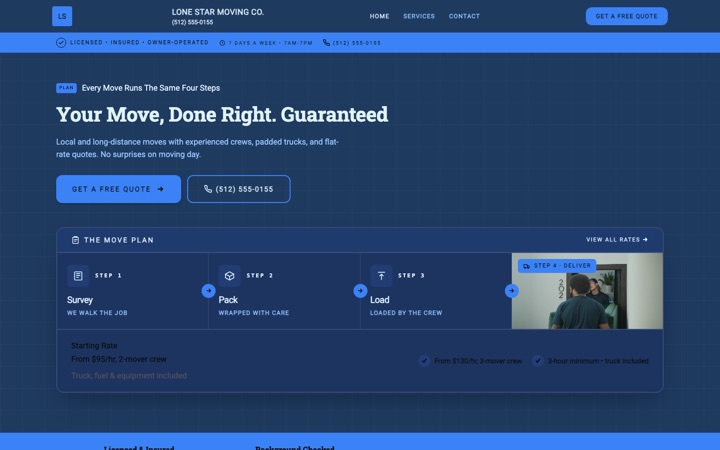
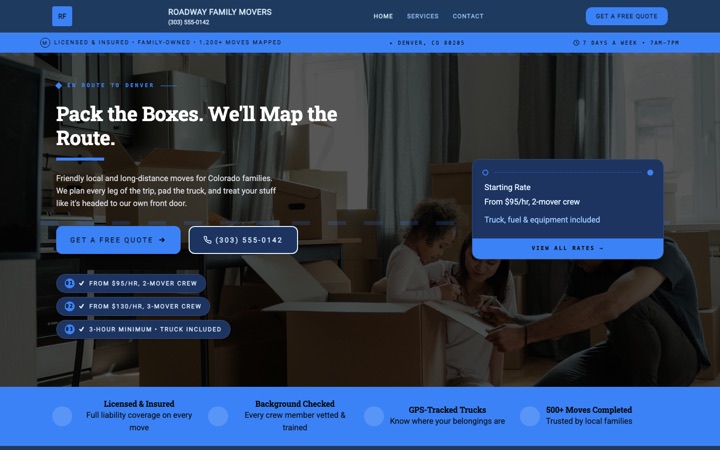
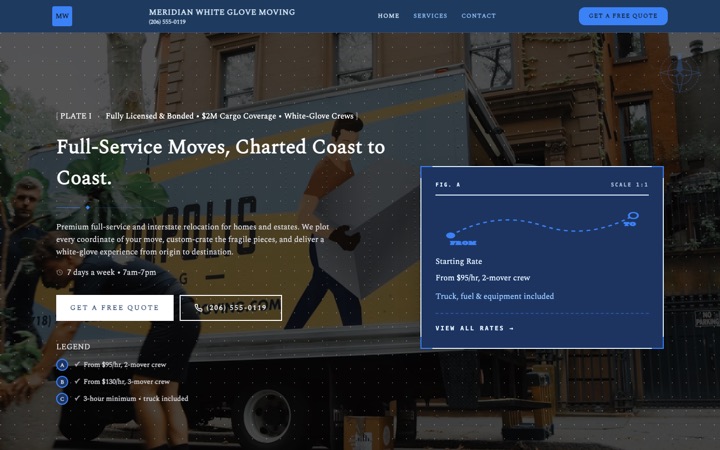
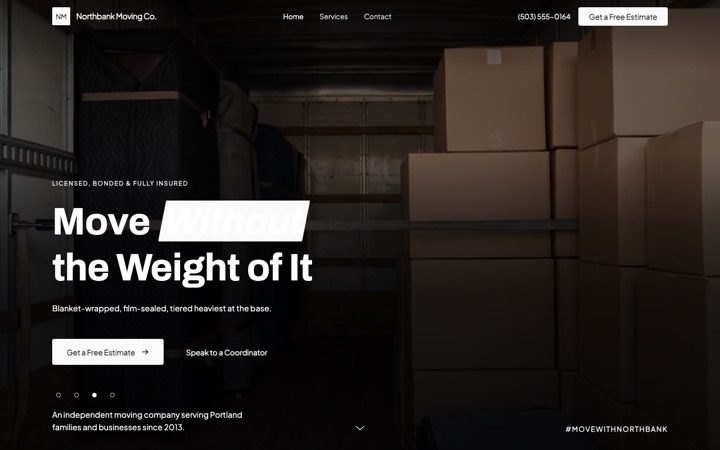
Four moving company website templates. One editor.
Every design below is a complete moving company website in its own right, not a color swap. Open any of them as a full live site, then switch between them later without losing a word you have written.
-
-
-
-


The moving company website that books moves while you're on the road
A moving company website with a quote form that asks what you need to price the job, a rates section for your crew prices, an email for every request, and a Lead Inbox to track each one from new to booked. Free to build and preview, with nothing to install.
Built for residential movers, commercial and office relocation crews, long-distance haulers, packing and unpacking specialists, loading-only labor teams, storage operators, and piano, safe, and specialty movers. Every section, form field and button is shaped around the way moving customers decide who to trust with everything they own.
- Free to build and preview
- A quote form you can price from
- Every request in your email and Lead Inbox
- Built for phones first
Built for movers. Built to win the quote.
Plenty of moving company websites bury the price, hide the license number, and lose the booking on a phone. This one was designed around two real people: the customer comparing five quotes the night before moving day, and the owner running a crew who can't sit at a laptop replying to inquiries between loads.
More booked moves, less phone tag
Every page leads to a quote form that asks the move date and how flexible it is, the home size, where from and where to, the floors and stairs at each end, and the services needed. By the time you call back you already know the job.
Every quote request comes to your email
When a customer sends the form, you get an email with every answer they gave, and you can reply straight to them. You don't have to log in to read it, and there's no app to install.
Every lead saved inside Buildrok
The same request lands in your Lead Inbox. Move it from new to contacted, quoted, booked or lost, set a priority, add private notes, and export the list to CSV. It's a simple way for a busy moving owner to see what's on for Saturday.
Your rates, up front
A rates table sets out your two-, three- and four-mover crews, the home size each suits and what's included, in your own figures. Customers see your number before they call, so the people who do call already know roughly where they stand.
A call button that stays on screen
On phones, a call button and a text button sit at the bottom of every screen as the customer scrolls, and the quote form is sized for a thumb. Somebody comparing movers late the night before is always one tap from reaching you.
Local search basics built in
Your business details are marked up for Google as a local business, each page has a title and description you can edit, and the towns you cover are listed on the page and on your areas page. Showing up for 'movers near me' or 'moving company in [your city]' also takes reviews and a Google Business Profile, which are yours to look after.
Everything a moving business actually needs
Not a kitchen sink of features you will never use. The sections and tools that turn moving website visitors into booked moves, each one checked against what the template really does.
A quote form built for movers
Move date and how flexible it is, home size (studio to four bedrooms plus, or an office), where from and where to, the property type, floor and stairs at each end, local or long-distance, the services needed, specialty items like a piano or a safe, and storage. Every label is yours to edit.
Crew rates up front
A rates table with two-, three- and four-mover crews, the home size each suits and what's included, plus a note for your minimum hours and travel time. A rate shows only once you set it; until then the row says 'Get a quote' rather than a price you never chose.
Your USDOT, MC number and coverage
The rates section has a line for your license numbers and a short statement of the protection that comes with every move, and the credentials strip carries a license number, your insurance, years in business and how far you travel. Each shows once you fill it in.
Local and long-distance services
List every service you offer: local and long-distance moves, commercial relocation, packing and unpacking, loading-only labor, storage, and piano, safe and specialty items. Each service can have a page of its own, and customers pick the one they need before they fill in the form.
An email for every request
The email carries the name, the phone number, the move date, home size, both addresses and every other answer. Tap to call, tap to reply. There's no app to install and no login to see it.
The Lead Inbox
Every request is saved in your Buildrok dashboard. Move it through new, contacted, quoted, booked and lost, set a priority, keep private notes, search by name, phone or address, filter by site if you run a second brand, and export to CSV.
Photo gallery for trucks, crews and real jobs
Show clean trucks, your crew, blanket-wrapped furniture and finished moves, in the gallery layout you pick. Photos of careful work help a price-sensitive shopper choose the careful crew over the cheapest one.
Reviews and trust badges
Add reviews from past customers or bring in your Google reviews, and write up to eight trust badges of your own, such as background-checked crews. The example badges and reviews never publish as yours.
A move-day timeline
Before, during and after: three steps to start from, from the walkthrough and quote to the sign-off, each one yours to rewrite. Customers see what happens on the day before they book.
Edit anything on the page
Tap any heading, paragraph, photo, crew rate, service or button to change it. Pick a color preset or use your own colors, and switch between Cargo, Ribbon, Atlas and Departures without losing your words. No plugins, no developer.
From template to booked moves in three steps
-
Pick the moving company template
Click 'Preview my moving site free'. Your site opens with sample crew tiers, a working quote form and the Cargo design already in place.
-
Make it yours, live
Add your business name, USDOT and MC numbers, crew rates, service areas, photos and contact details. Tap anything on the page to change it, and every change saves as you go.
-
Go live and catch every lead
Publish it. From then on every quote request lands in your email and your Buildrok Lead Inbox. Put it on your own domain when you're ready: a new one registered in your name, or connect one you already own.
The lead system that ships with every moving site
A good-looking website is no use if the quote request gets lost between loads. Here is what happens when a customer finds your site and taps the quote button.
-
Customer fills in the quote form
The form sits on the home, services and contact pages. It asks the right questions for a moving quote: the move date, home size, both addresses, floors and stairs at each end, the services needed and any specialty items.
-
You get an email
When they press send, an email arrives with every answer they gave, so you can call back from the next driveway. No app, no login.
-
The lead is filed in your Buildrok inbox
At the same time, the request appears in your Lead Inbox, where you move it from new to contacted, quoted, booked or lost, add notes, and export to CSV any time.
-
You call back with a number
You know the date, the home size, both addresses and the stairs before you dial, so you can talk price on the first call rather than starting with twenty questions.
Show customers exactly what you move
List every service you offer, next to crew rates that show what each size covers. Customers pick the kind of move they need before they fill in the form, which means fewer 'just looking' calls and shorter quote conversations.
- Local residential moves
- Long-distance and interstate moves
- Commercial and office relocation
- Apartment and studio moves
- Full-service packing and unpacking
- Packing supplies and materials
- Loading-only labor
- Unloading-only labor
- Short and long-term storage
- Piano and safe moving
- Specialty and antique item moves
- Last-minute and same-day moves
Reasons customers pick you over the cheapest truck
Moving is personal. Customers are handing over every box, every photo album, every piece of furniture they own. The template gives you a place for each of these, so you can show why you're worth trusting before they pick up the phone. Each one appears once you fill it in.
- Your USDOT and MC numbers, where customers check them
- Your license and insurance, in the credentials strip
- The protection that comes with every move, in your words
- Trust badges you write yourself, such as background-checked crews
- Your crew rates and what each one includes
- Your move day, step by step, before, during and after
- Reviews you add, or bring in from Google
- Years in business, counted from the year you started
- How far you travel
- Photos of your trucks and crews on real jobs
Stop losing moves to faster crews
Somebody near you is comparing moving quotes right now. Give them a site that shows your rates, asks the home size and the route, and puts the request in your email and your Lead Inbox before your competitor calls them back.
What it costs
$29 a month
Or $276 a year, which is $23 a month. Building and previewing are free, with no card.
- Every page your design has, plus up to 5 of your own
- A standard .com, .net, .org, .co, .us domain, registered in your name and renewed while you're subscribed
- Or connect a domain you already own, free
- Hosting and the security padlock
- A quote form built for your trade, with junk and bot messages blocked
- The Lead Inbox, to track every job from new to booked
- A photo gallery of your work
- A call button that stays on screen on phones
- Built for local Google searches
Cargo template questions
Is this moving company website template really free to preview?
Yes. You can preview the full moving company template, edit your business name, crew rates, services, photos and content, and share a preview link without entering any payment details. You only pay when you put it on your own domain.
How fast can I get my moving website live?
The same day, if you build it yourself. Pick a design, tap any text or photo to change it, add your USDOT and MC numbers, crew rates and contact details, then publish. How long it takes depends on how much you want to write. There's no code, no plugins and no developer.
Does the moving template include a quote form?
Yes. Every Buildrok moving website comes with a quote form built for movers. Customers tell you the move date and how flexible it is, the home size, both addresses, the floors and stairs at each end, the services needed, any specialty items and whether they need storage. You can change every label.
Can I show transparent hourly pricing on the site?
Yes. The rates section has two-, three- and four-mover crews, the home size each suits and what's included, plus a note for your minimum hours and travel time. You set the rates and the customer sees them up front. Until you set one, the row shows 'Get a quote' rather than a price you never chose.
Where do my moving leads go when someone fills out the form?
Two places at the same time. You get an email with every answer, and the same request is saved in your Buildrok Lead Inbox, where you move it through new, contacted, quoted, booked or lost.
What is the Buildrok Lead Inbox?
A simple place to track the jobs that come in from your site. Every request lands in one list. You move each one from new to contacted, quoted, booked or lost, set a priority, add private notes, search by name, phone or address, filter by status, site or source, and export to CSV any time. It comes with the plan, with no spreadsheet and no extra subscription.
Where do I show my DOT, MC number, and insurance?
In two places. The rates section has a line for your license numbers, USDOT and MC included, and a short statement of the protection that comes with every move; the credentials strip near the top of the page carries a license number, your insurance, years in business and how far you travel. Each shows once you fill it in, and you type the numbers exactly as you want them to appear.
Does the template handle long-distance moves as well as local?
Yes. List local, long-distance, commercial, packing, loading-only, storage and specialty work as services, each with a page of its own. The quote form asks both addresses and whether the move is local or long-distance, so you can quote either kind of job from the same request.
Will my moving website rank on Google?
It's built for local Google searches from the start: your business is marked up as a local business, each page has a title and description you can edit, and the towns you cover are on the page and on your areas page. A site shows up in Google once it's on your own domain. Ranking for 'movers in [your city]' or 'long-distance moving company near me' also takes reviews and a Google Business Profile, which are yours to look after.
Is the moving template mobile-friendly?
Yes. It's built for phones first, with a call button that stays on screen and a quote form sized for a thumb. The hero film doesn't load on phones, so the first screen shows a still photo instead. It's designed for the phone in the hand of somebody shopping for a mover the night before.
Can I rank in more than one city or service area?
Yes, with one condition. Every plan has an areas page that lists every town, suburb or zip code you cover, and a page of its own for your main city. More town pages, one for each place you want to target beyond your home base, come with the Local SEO Pro add-on.
How much does the moving website cost after the free preview?
One plan, $29 a month or $276 a year. It includes every page this design has (home, services and contact, plus a page for each service), up to 5 pages of your own, your areas page, hosting and the security padlock. A new domain (.com, .net, .org, .co, .us) is registered in your name while you're subscribed, or you can connect one you already own for free. Cancel any time.
More for moving company businesses
Every service business template
Designs built for plumbers, cleaners, electricians, movers, barbers and more.
- Cleaning website template
- Mobile detailing website template
- Landscaping website template
- HVAC website template
- Contractor website template
- Food truck website template
- Barber shop website template
- Electrician website template
- Plumber website template
- Premium cleaning website template
- Modern cleaning website template
- Cleaning website template house notes
- Premium moving company website template
- Mobile notary website template
- Roofing website template
- Cottage food bakery website template
- Mobile detailing website template window sticker
- HVAC website template gauge
- Cottage food bakery website template linen
- Cottage food bakery website template pantry
- Cottage food bakery website template rise
- Mobile detailing website template chrome
Your moving company website, live today.
Pick a design, change anything you want, and publish when it's right. Free to build and preview with no card. The plan is $29 a month once it's on your own domain, and you can cancel any time.