

Mainline
Plumber website template
A done-for-you plumbing website that books emergency calls, water heater installs, and sewer line jobs, with an urgency-aware quote form, license-forward trust blocks, and a built-in Lead Inbox.
Free to build and publish, no card required. $29 a month puts it on your own domain, with the domain included.
- A quote form that asks whether it's an emergency
- A call button that stays on screen on phones
- Your license and insurance, shown once you add them
- An email for every new request
- The Lead Inbox, from new to booked
- A page for each service, from water heaters to sewer lines
- An areas page, and a page for your main city
- Change any word or photo by tapping it

Plumber design
Mainline
Built from: The felt letterboard over a trade counter: white push-in capitals, the job on the left and the price on the right.
Conservative and service-led, with the callout fee stated up front. The default for residential repair and drainage.
- A quote form shaped for plumbing
- An emergency section with its own call button
- Every request emailed to you
- A Lead Inbox for every request
- License and insurance up front
- A page for each service
Done for you
We'll build your plumbing website in 2 business days.
So the next 11pm burst pipe finds a number that answers, not a Facebook page from 2019.
$99 today, $400 on approval, then $79/month starting 30 days after go-live. 30-day money-back guarantee from the day it goes live, no reason needed, and you keep the domain. Registration and the first year are included.
Rather build it yourself? Start free. Either way you end up in the same editor, with the same Lead Inbox; done for you means the first version is built for you, and we keep changing it on the $79/month managed plan.
-
Will anyone actually call at 11pm?
Emergency work is decided on the phone in thirty seconds. The site we build leads with a tap-to-call bar on every screen and an emergency line that says you pick up. Nothing to find, nothing to scroll past.
-
I don't have time to write any of this.
You don't. Send the services you do, the areas you cover and your hours from the truck; we write the rest, and you read it before it goes live. 2 rounds of changes included.
-
Same-day means same-day.
Your service pages say what you can do today and what books for tomorrow, so the job that reaches you is one you can take.
Three plumber website templates. One editor.
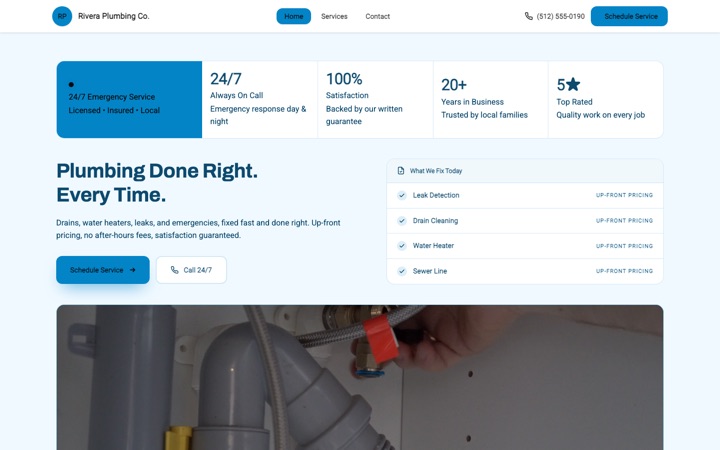
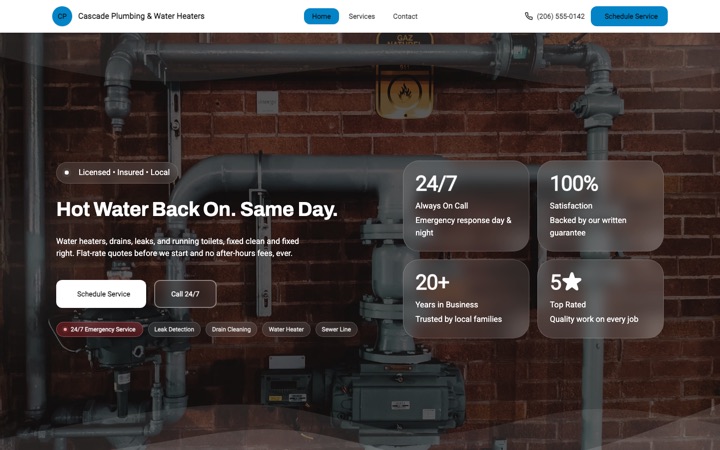
Every design below is a complete plumber website in its own right, not a color swap. Open any of them as a full live site, then switch between them later without losing a word you have written.
-
-
-
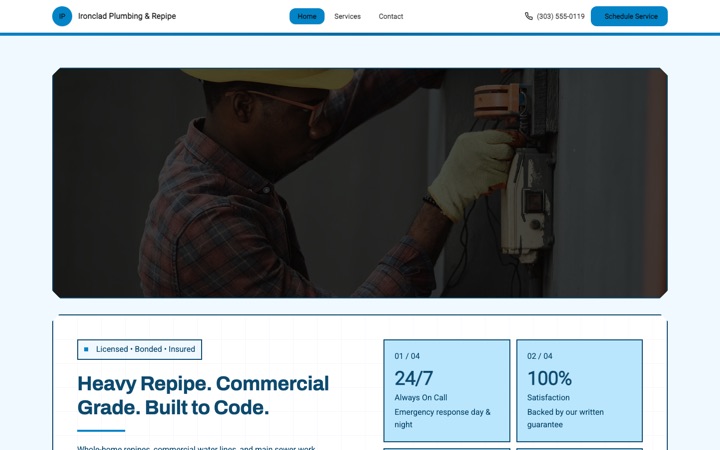


The plumber website that books emergency calls before the floor is dry
A plumbing website with a quote form that asks whether it's an emergency, every request emailed to you the moment it's sent, a call button that stays on screen on phones, and a Lead Inbox to track each job from new to booked. Free to build and preview.
Built for solo licensed plumbers, two-truck residential crews, commercial plumbing contractors, drain cleaning specialists, water heater pros, repipe and sewer line teams, and plumbers who take the after-hours emergencies. Every section, form field and button is shaped around how people pick a plumber when there is water on the kitchen floor.
- Free to build and preview
- A quote form on your home, services and contact pages
- Every request emailed to you
- A call button that stays on screen on phones
Built for plumbers. Built to convert.
A plumbing website can bury the phone, hide the license and treat a slow drain the same as a flooded basement. This one was designed around two people: the homeowner standing in an inch of water at 2am deciding who to call, and the licensed plumber under a sink who can't sit at a laptop answering inquiries between jobs.
Fewer callbacks spent asking the basics
The quote form asks the service, how urgent it is, where in the house the problem is, the property type, roughly when the home was built and what's going on, and takes a photo of the leak. By the time you call back you already know what you're walking into.
Every request in your email
The moment a customer sends the form, you get an email with everything they wrote, including how urgent they said it is and any photo they added. Call, reply or text them straight from the email.
Every request saved inside Buildrok
The same request lands in your Lead Inbox. Move it through new, contacted, quoted, booked or lost, add private notes, and export the list to CSV whenever you want it. No spreadsheet to keep, and nothing lost in a text thread.
A call button that stays on screen
On a phone, a call button stays at the bottom of the screen as the visitor scrolls, and the emergency section has a tap-to-call button of its own. When water is hitting hardwood floors, the homeowner is one tap from your phone, not three scrolls deep on a contact page.
Looks like a licensed pro, not a DIY site
Your license number and insurance sit in a strip under the headline, and the Mainline hero lists your jobs and prices like the felt letterboard over a trade counter. The kind of site that earns the click on a Google search and the trust on the doorstep when a wet, anxious homeowner opens the door.
Built for local Google searches
The business details Google reads, clear headings, a page for each service, an areas page listing every town you cover and a page of its own for your main city on every plan. More town pages are an add-on. No agency needed to start showing up for 'emergency plumber near me' or 'water heater repair in [your city]'.
Everything a plumbing business actually needs
Not a kitchen sink of features you will never use. The tools that turn plumber website visitors into paid emergency calls, water heater installs and repipe jobs.
A quote form shaped for plumbing
Service needed, how urgent it is (no rush, in the next day or two, or an emergency), where the issue is, property type, year built, a description and a photo of the leak or fixture. Every label and option can be changed, and the service list comes from the services on your page.
An emergency section with its own call button
A section for burst pipes, sewer backups and dead water heaters, with what to do first, a tap-to-call button and a button to the quote form. The words are yours to change, so it never promises hours you don't keep.
Every request emailed to you
An email lands with the name, phone, service, urgency, the description and any photo. Tap to call, tap to reply. No app to install and no login to read it.
A Lead Inbox for every request
Every request is saved in your Buildrok dashboard, where you move it through new, contacted, quoted, booked and lost. Search by name, email or phone, filter by site if you run a separate commercial brand, and export to CSV.
License and insurance up front
A strip under the headline for your license number, your insurance, the year you started and how far you travel, plus a row of badges for anything else, like a bond or a backflow tester certificate. A published site shows only what you've filled in, never an example as yours.
A page for each service
Drain cleaning, water heaters and emergency calls come filled in as examples. Add repipes, sewer lines, gas lines or whatever else you do, and each service can have a page of its own on your site, which helps it show up in searches for that job.
Prices and financing, if you offer them
Show a price on any service, and a financing section for big jobs like water heaters and repipes, with the terms you actually offer. Financing appears on a published site only once you've filled it in.
The towns you serve
List every town you cover on your areas page, and give your main city a page of its own for 'plumber in [city]' searches. That page is included on every plan; more town pages are an add-on.
Call and quote buttons that are always near
On phones, a call button (and a text button, if you want one) stays at the bottom of the screen. The quote form sits on your home, services and contact pages, so it's never far from the page someone is reading.
Tap any text to change it
Tap any heading, paragraph, photo, price, service or button to change it. Pick a color preset or your own colors, and switch between the plumber designs, Mainline, Current and Copper, any time without losing your words. No plugins, no themes and no developer tickets.
From template to booked service calls in three steps
-
Pick a plumber design
Click 'Preview my plumbing site free'. Your site opens with example services, a working quote form and the Mainline design in place. Switch to Current or Copper any time.
-
Make it yours
Add your business name, license number, services, photos, the towns you serve and your contact details. Tap anything on the page to change it, and see the result as you go.
-
Go live and catch every request
Publish, and every quote request lands in your email and your Buildrok Lead Inbox. Put it on your own domain when you're ready: a new one registered in your name, or one you already own, connected free.
The lead system that comes with every plumbing site
A good-looking website is worth little if it doesn't turn into booked emergency calls. Here's exactly what happens when a panicked homeowner finds your site at midnight and sends the quote form.
-
The customer fills in the quote form
The form sits on your home, services and contact pages. It asks what a plumber needs to know: the service, how urgent it is, where the problem is, the property type, when the home was built, a short description and a photo.
-
You get an email with the urgency in it
The email is sent the moment they submit, with how urgent they said it is right there in the details. A flooded kitchen doesn't read like a routine faucet quote.
-
The request is saved in your Buildrok inbox
At the same time, the request appears in your Lead Inbox, where you move it through new, contacted, quoted, booked or lost. Add notes, and export to CSV any time.
-
You call back knowing the job
You know how urgent it is, where in the house the problem is and what it looks like before you dial, so the first call is about the fix rather than twenty questions. On a true emergency, getting there first is the difference between a booked call and a competitor's truck in the driveway.
Show customers exactly what you fix
A clear list of every service you offer, with a price if you want to show one, and each service can have a page of its own for stronger local search. Customers pick the service before they fill in the form, which means clearer requests, faster triage and shorter callbacks.
- Emergency plumbing
- Leak detection and repair
- Drain cleaning and hydro jetting
- Water heater install and repair (tank and tankless)
- Trenchless sewer line repair
- Whole-home repipes
- Garbage disposal install and repair
- Faucet, fixture and toilet replacement
- Sump pump install and replacement
- Gas line install and repair
- Backflow testing and certification
- Commercial plumbing service
Reasons customers pick you over the cheapest quote
Plumbing is not a coin flip. A bad install floods a basement and ruins a floor. The template gives you the space to show why you're worth trusting before anyone picks up the phone, and each of these is something you fill in. A published site never claims one for you.
- Your state license number, under the headline
- Your insurance and bond
- Years in business, from the year you started
- How far you travel
- The brands you install and service
- Certifications, like backflow testing
- Your pricing policy, in your own words
- Reviews from past customers, added by you
Stop losing emergency calls to faster plumbers
Someone near you is searching for a plumber with a burst pipe right now. Get a site that catches them, asks how urgent it is, and puts the request in your email while they're still on the page.
What it costs
$29 a month
Or $276 a year, which is $23 a month. Building and previewing are free, with no card.
- Every page your design has, plus up to 5 of your own
- A standard .com, .net, .org, .co, .us domain, registered in your name and renewed while you're subscribed
- Or connect a domain you already own, free
- Hosting and the security padlock
- A quote form built for your trade, with junk and bot messages blocked
- The Lead Inbox, to track every job from new to booked
- A photo gallery of your work
- A call button that stays on screen on phones
- Built for local Google searches
Mainline template questions
Is this plumber website template really free to preview?
Yes. You can build the whole site, add your business name, license number, services, photos and content, and share a preview link without entering any payment details. You only pay when you put it live on your own domain.
How fast can I get my plumbing website live?
The same day, if you build it yourself. Pick the design, tap any text or photo to change it, add your license number, services and contact details, then publish. No code, no plugins and no developer.
Does the plumber template include a quote form?
Yes. Every Buildrok plumbing website comes with a quote form built for plumbers. Customers tell you the service they need, how urgent it is (no rush, in the next day or two, or an emergency), where the issue is, the property type, roughly when the home was built and what's going on, and they can add a photo. Every label and option is yours to change, and junk and bot messages are blocked.
How does the urgency-aware quote form actually work?
The form asks how soon the customer needs you, from no rush to an emergency. Their answer is in the email you get and on the request in your Buildrok Lead Inbox, so a flooded kitchen doesn't get buried under a routine faucet quote.
Does it handle 24/7 emergency calls?
The site takes requests at any hour; how you answer them is up to you. On a phone, a call button stays on screen as the visitor scrolls, and the emergency section has a tap-to-call button of its own. The quote form asks how urgent the job is, so emergencies stand out. Whether you advertise night and weekend service is your call, and the site never says it for you.
Can I show my license number, bond, and insurance details?
Yes. A strip under the headline has a place for your license number, your insurance, the year you started and how far you travel, and a row of badges takes anything else, like your bond or a backflow tester certificate. A published site shows them only once you've filled them in, so it never shows an example number as yours.
Where do my plumbing leads go when someone fills out the form?
Two places at once. You get an email with everything they sent, including how urgent they said it is, and the same request is saved in your Buildrok Lead Inbox, where you move it through new, contacted, quoted, booked or lost.
What is the Buildrok Lead Inbox?
The list where every request from your site lands, built for service businesses. Move each one through new, contacted, quoted, booked or lost, add private notes, search by name, email or phone, and export to CSV any time. It's part of the plan, so there's no spreadsheet to keep and no extra subscription.
Can I show water heater, repipe, and sewer line jobs as their own services?
Yes. Add each one as a service, with a description and a price if you want to show one, and on this design each service can have a page of its own, which helps it show up in searches for that job. Drain cleaning, water heaters and emergency calls come filled in as examples for you to replace.
Will my plumbing website rank on Google?
Nobody can promise a ranking, but the site is built for local Google searches from the start: the business details Google reads, proper headings, clean page addresses, a page for each service, an areas page listing every town you cover and a page of its own for your main city (more town pages are an add-on). Pair it with a Google Business Profile and a steady stream of reviews, which are still yours to look after, to compete for 'emergency plumber near me' and 'water heater repair in [your city]' searches.
Is the plumber template mobile-friendly?
Yes. It's laid out for phones first, with a call button that stays on screen, a quote form that's easy to fill in with a thumb, and a photo field for the leak. Someone with water on the floor is often searching on the phone in their hand, so that's the screen it was built for.
How much does the plumbing website cost after the free preview?
One plan, $29 a month or $276 a year. It includes every page this design has plus up to 5 of your own, hosting, the security padlock, and a .com, .net, .org, .co, .us domain registered in your name, or connect one you already own for free. Cancel any time.
More for plumber businesses
Every service business template
Designs built for plumbers, cleaners, electricians, movers, barbers and more.
- Cleaning website template
- Mobile detailing website template
- Landscaping website template
- HVAC website template
- Contractor website template
- Food truck website template
- Moving company website template
- Barber shop website template
- Electrician website template
- Premium cleaning website template
- Modern cleaning website template
- Cleaning website template house notes
- Premium moving company website template
- Mobile notary website template
- Roofing website template
- Cottage food bakery website template
- Mobile detailing website template window sticker
- HVAC website template gauge
- Cottage food bakery website template linen
- Cottage food bakery website template pantry
- Cottage food bakery website template rise
- Mobile detailing website template chrome
Your plumbing website, live today.
Pick the design, change anything you want, and publish the same day. Free to build and preview with no card, and you only pay when it goes live on your own domain. Cancel any time.