

Ledger
Barber shop website template
A done-for-you barber shop website that fills chairs, with a dark shop-window hero, a price menu board, a gallery of finished cuts, a booking request form, and a built-in Lead Inbox.
Free to build and publish, no card required. $29 a month puts it on your own domain, with the domain included.
- A dark shop-window hero
- A price menu for cuts and shaves
- A photo gallery of finished work
- A booking request form
- An email for every booking request
- The Lead Inbox, from new to booked
- Your Calendly, or Buildrok's own booking calendar
- A call button that stays on screen on phones

Barber shop design
Ledger
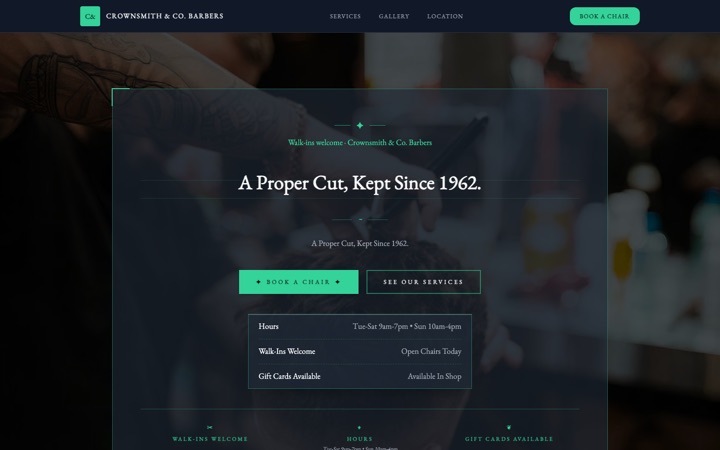
Vintage ledger type and heavy rules. Suits a shop trading on craft, straight razors and a long-standing name.
- A shop-window hero
- A price menu, barber-shaped
- A gallery of finished cuts
- A booking request form
- Calendly or Buildrok's booking calendar
- Hours, location and a closed-today banner
Done for you
We'll build your barbershop website in 2 business days, with your fades on it.
Walk-ins or bookings, the site shows the work and makes the next chair one tap away.
$99 today, $400 on approval, then $79/month starting 30 days after go-live. 30-day money-back guarantee from the day it goes live, no reason needed, and you keep the domain. Registration and the first year are included.
Rather build it yourself? Start free. Either way you end up in the same editor, with the same Lead Inbox; done for you means the first version is built for you, and we keep changing it on the $79/month managed plan.
-
Show the cuts, not a stock photo of scissors.
Your gallery, your chairs, your crew. Send the photos from your phone and we lay them out. A shop site that looks like your shop is the whole sell.
-
Walk-ins are fine. Bookings are better.
Bookings through your Calendly or our own booking calendar, plus your hours and a price menu that stays right because you can change it yourself any time.
Three barber shop website templates. One editor.
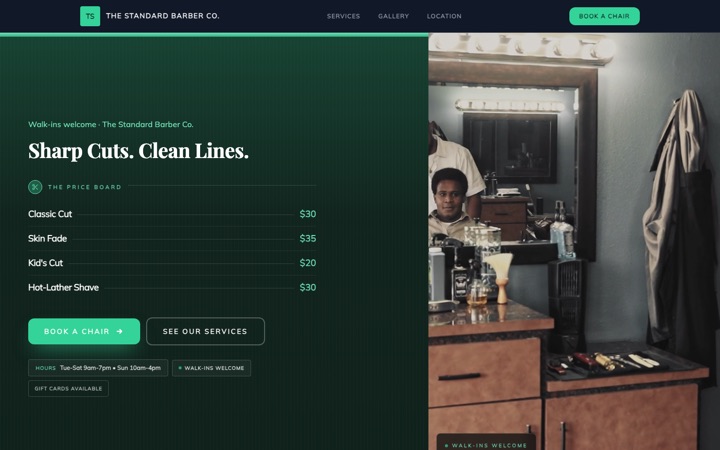
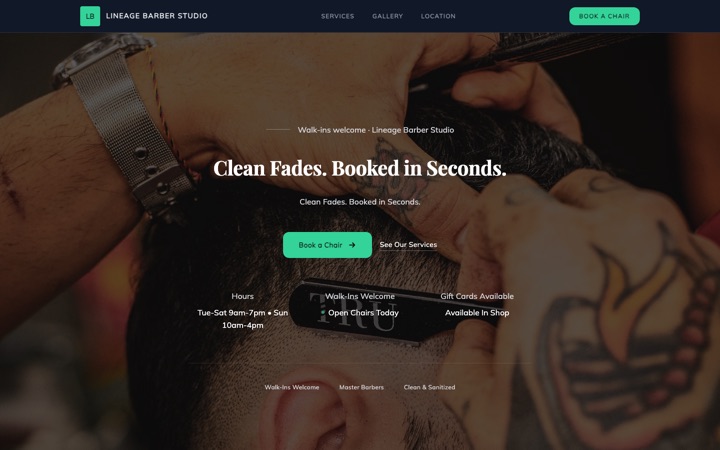
Every design below is a complete barber shop website in its own right, not a color swap. Open any of them as a full live site, then switch between them later without losing a word you have written.
-
-
-


The barber shop website that fills chairs between walk-ins
A barber shop website with a price menu customers can scan, a booking request form that offers the services on your menu, a gallery of finished cuts, and your hours and address with a map. Every request is emailed to you and saved in your Lead Inbox. Free to build and preview.
Built for traditional barber shops, modern men's grooming studios, single-chair operators, multi-chair shops with named barbers, kid-friendly cut spots, hot-towel shave specialists, and shops that take walk-ins alongside booked appointments. Every section, form field and button is shaped around how people decide which chair to sit in.
- Free to build and preview
- A price menu customers can scan
- Every booking request emailed to you
- A call button that stays on screen on phones
Built for barbers. Built to fill chairs.
A barber shop website is often an afterthought: a slow page with a phone number and a Facebook link. This one was designed around two people: the customer scrolling Instagram looking for their next cut, and the owner running a chair who can't text every booking request back between fades.
More booked cuts, less phone tag
The book buttons across the page lead to a booking request form. By the time the request reaches you, you know the customer's name and phone, the service from your menu, the day they want and whether that's morning, afternoon or evening.
Every request in your email
The moment a customer sends the form, you get an email with the full request. No login needed to read it, and you can call, reply or text them straight from it, from the chair.
Every request saved inside Buildrok
The same booking request lands in your Lead Inbox. Move it through new, contacted, quoted, booked or lost, add private notes, and search by name or phone. No spreadsheet to keep, and nothing lost in a text thread.
A site that looks as sharp as your cuts
Heritage opens on a barbershop's front window: your name in gold on dark glass, your services and prices lettered under it, your hours along the foot. Modern and Ledger take it in other directions, and you can switch between them without losing your words.
A call button that stays on screen
On a phone, a call button stays at the bottom of the screen as the customer scrolls, so the next chair is always one tap away. The booking form is laid out to be filled in with a thumb.
Built for local Google searches
The business details Google reads, including your hours and address, and clear headings for 'barber in [your city]' searches. No agency needed to start showing up for 'best barber near me' or 'fade in [your city]'; your Google Business Profile and reviews are still yours to look after.
Everything a barber shop actually needs
Not a kitchen sink of features you will never use. The tools that turn barber website visitors into booked chairs.
A shop-window hero
Heritage opens on a barbershop's front window: your name in gold on dark glass, your services and prices lettered under it from your own menu, and your hours along the foot of the glass. Change a price once and it changes in the window and on the menu.
A price menu, barber-shaped
Cuts, fades, beard trims, hot towel shaves, kids' cuts and lineups each get a row with the price you type beside it. Customers pick the service before they book, so the requests you get back are clear about what they want.
A gallery of finished cuts
A photo gallery built to show tapers, fades, beard work and lineups, with a caption on each if you want one. Your own photos are what a new customer looks for before they pick a barber.
A booking request form
Name, phone, service, preferred date, morning, afternoon or evening, and notes. Every label is editable, and the service list comes from your menu, so a customer books the cut they just read about. Junk and bot messages are blocked.
Calendly or Buildrok's booking calendar
Already book through Calendly? Add your link and the site shows your Calendly calendar in place of the request form. Or switch on Buildrok's own booking calendar: set your hours, and customers ask for an open time, which is held for them while you confirm or decline it.
Hours, location and a closed-today banner
A section for your opening hours, your address and a map, plus a 'closed today' banner you can switch on for the days the shop is shut. Say plainly whether you take walk-ins, so customers arrive with the right expectations.
Every booking request emailed to you
An email lands with the name, phone, service, day and time of day. Tap to call, tap to reply, tap to text. No app to install and no login to read it.
A Lead Inbox for every request
Every request is saved in your Buildrok dashboard, where you move it through new, contacted, quoted, booked and lost. Search by name, email or phone, add notes, and export to CSV any time.
Your barbers, your reviews and your license
Add each barber with a photo, a role and a short bio, add reviews from your clients, and put your license number and the year you started in a strip under the headline. A published site shows only the barbers, reviews and details you've added, never the examples.
Tap any text to change it
Tap any heading, paragraph, photo, price, service or button to change it. Update a price, swap a barber's name or change your hours, pick a color preset or your own colors, and switch between Heritage, Modern and Ledger any time. No plugins, no themes and no developer tickets.
From template to booked chairs in three steps
-
Pick the barber shop template
Click 'Preview my barber site free'. Your site opens with an example price menu, a working booking form and the Heritage design in place.
-
Make it yours
Add your shop name, barbers, prices, photos of your best cuts, opening hours and contact details. Tap anything on the page to change it, and see the result as you go.
-
Go live and catch every booking
Publish, and every booking request lands in your email and your Buildrok Lead Inbox. Add your Calendly link or switch on Buildrok's booking calendar when you're ready, or run on the request form alone.
The booking system that comes with every barber site
A good-looking website is worth little if it doesn't fill chairs. Here's exactly what happens when a customer finds your site and taps to book.
-
The customer fills in the booking request form
The book buttons in the header, the hero and the price menu take them to it. It asks what a barber needs to know: name, phone, the service, a preferred date, morning, afternoon or evening, and any notes.
-
You get an email straight away
The email is sent the moment they submit, with everything you need to confirm by reply, call or text from the chair. No app, no login, no waiting on a digest.
-
The request is saved in your Buildrok inbox
At the same time, the request appears in your Lead Inbox, where you move it through new, contacted, quoted, booked or lost. Add notes, and export to CSV any time.
-
You confirm the time and lock the chair
The customer already picked a service from your menu and a part of the day, so your reply is a time, not a conversation about what a fade costs. Send it between cuts and the chair is theirs.
Show customers exactly what's on the menu
A price menu for every service in your shop, with the price you type beside each one, so a customer knows the cost before they book. Customers pick the cut they want, which means clearer requests, fewer 'how much for a fade?' calls, and a chair that's easier to fill.
- Men's cuts
- Skin fades and tapers
- Beard trims and lineups
- Hot towel shaves
- Kids' cuts
- Senior cuts
- Cut and beard combo
- Designs and hair art
- Color and gray blending
- Hair wash and style
- Walk-in tidy-ups
- Wedding and event grooming
Reasons customers pick your chair over the cheapest cut
Grooming is personal. Customers are letting a stranger near their face, their hairline and their wedding photos. The template gives you the space to show why your chair is worth the booking, and each of these is something you fill in. A published site never claims one for you.
- Your barber license number, under the headline
- Years cutting, from the year you started
- Reviews from your clients, added by you
- Photos of your own finished cuts
- Your barbers, with a photo and a short bio
- Walk-ins or appointment only, stated plainly
- Your hours, and a closed-today banner when you need it
- Your prices, before anyone books
- Kid-friendly chairs, if you offer them
- Hot towel and straight-razor shaves, if you do them
Stop losing bookings to the shop down the street
Your next regular is scrolling Instagram right now. Get a site that catches them, shows your prices and your work, and puts the booking request in your email while they're still looking.
What it costs
$29 a month
Or $276 a year, which is $23 a month. Building and previewing are free, with no card.
- Every section your design has, on one page
- A standard .com, .net, .org, .co, .us domain, registered in your name and renewed while you're subscribed
- Or connect a domain you already own, free
- Hosting and the security padlock
- A quote form built for your trade, with junk and bot messages blocked
- The Lead Inbox, to track every job from new to booked
- A photo gallery of your work
- A call button that stays on screen on phones
- Built for local Google searches
Ledger template questions
Is this barber shop website template really free to preview?
Yes. You can build the whole site, add your shop name, prices, services, photos and content, and share a preview link without entering any payment details. You only pay when you put it live on your own domain.
How fast can I get my barber shop website live?
The same day, if you build it yourself. Pick the design, tap any text or photo to change it, add your prices, barbers, hours and contact details, then publish. No code, no plugins and no developer.
Does the barber template include a booking form?
Yes. Every Buildrok barber website comes with a booking request form. Customers give their name and phone, pick a service from your menu, a preferred date and morning, afternoon or evening, and add any notes. Every label is yours to change, junk and bot messages are blocked, and you confirm each request by reply, call or text.
Can I connect Square, Booksy, or Fresha for live booking?
Not as a live calendar on the page. The booking embed shows a Calendly calendar: add your Calendly link and it takes the place of the request form. Or switch on Buildrok's own booking calendar, where customers ask for an open time from your hours and you confirm it. If your clients already book through Square, Booksy or Fresha, keep the request form on the site and enter what comes in wherever you already keep your book.
Where do my booking requests go when someone fills out the form?
Two places at once. You get an email with the full request, and the same request is saved in your Buildrok Lead Inbox, where you move it through new, contacted, quoted, booked or lost.
What is the Buildrok Lead Inbox?
The list where every booking request from your site lands, built for service businesses. Move each one through new, contacted, quoted, booked or lost, add private notes, search by name, email or phone, and export to CSV any time. It's part of the plan, so there's no spreadsheet to keep and no extra subscription.
Can I show different prices for cuts, fades, and shaves?
Yes. The price menu has a row for each service, cuts, skin fades, beard trims, hot towel shaves, kids' cuts, lineups and designs, with the price you type beside it. Customers scan it before they book, the booking form offers the same services, and on Heritage the prices are lettered in the shop window too.
Will my barber shop website rank on Google?
Nobody can promise a ranking, but the site is built for local Google searches from the start: the business details Google reads, including your opening hours and address, proper headings and a clean page address. Pair it with a Google Business Profile with real photos of your cuts and reviews that mention the styles you do, which are still yours to look after, to compete for 'barber in [your city]' and 'best fade near me' searches.
Can I show photos of my finished cuts?
Yes. The template comes with a photo gallery built for barbers. Upload shots of your tapers, fades, beard work and lineups, add captions, and pick how the gallery is laid out. Your own work is what a new customer wants to see before they pick a barber.
Is the barber template mobile-friendly?
Yes. It's laid out for phones first, with a call button that stays on screen and a booking form that's easy to fill in with a thumb. Plenty of people find their next barber on the phone in their hand, so that's the screen it was built for.
Can I use this template if I run a single chair from home or a suite?
Yes. The template works for traditional barber shops, modern men's grooming studios, single-chair operators, suite-rental barbers, multi-chair shops with named barbers, kid-friendly cut spots and hot-towel shave specialists. The services, booking form options, barbers and credentials are all yours to change, and the barbers section only appears once you've added someone.
How much does the barber shop website cost after the free preview?
One plan, $29 a month or $276 a year. It includes every section this design has, on one page, with hosting, the security padlock, and a .com, .net, .org, .co, .us domain registered in your name, or connect one you already own for free. Cancel any time.
Every service business template
Designs built for plumbers, cleaners, electricians, movers, barbers and more.
- Cleaning website template
- Mobile detailing website template
- Landscaping website template
- HVAC website template
- Contractor website template
- Food truck website template
- Moving company website template
- Barber shop website template
- Electrician website template
- Plumber website template
- Premium cleaning website template
- Modern cleaning website template
- Cleaning website template house notes
- Premium moving company website template
- Mobile notary website template
- Roofing website template
- Cottage food bakery website template
- Mobile detailing website template window sticker
- HVAC website template gauge
- Cottage food bakery website template linen
- Cottage food bakery website template pantry
- Cottage food bakery website template rise
- Mobile detailing website template chrome
Your barber shop website, live today.
Pick the design, change anything you want, and publish the same day. Free to build and preview with no card, and you only pay when it goes live on your own domain. Cancel any time.