

Canopy
Landscaping website template
A done-for-you landscaping business website that books recurring routes and one-off jobs, with a smart landscape-shaped quote form, a project gallery, and a built-in Lead Inbox.
Free to build and publish, no card required. $29 a month puts it on your own domain, with the domain included.
- A quote form built for landscapers
- Weekly, every-other-week or one-off service
- A project gallery, or before-and-after pairs
- An email for every new request
- The Lead Inbox, from new to booked
- Seasonal specials, shown once you write them
- A call button that stays on screen on phones
- Change any word or photo by tapping it

Lawn & landscape design
Canopy
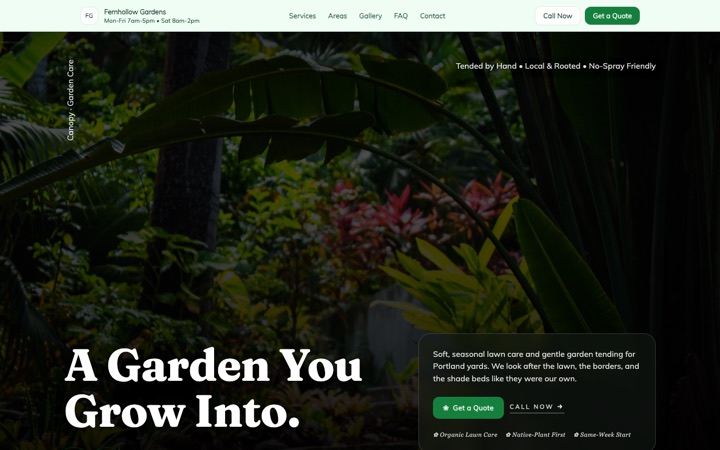
Garden editorial, heavy on planting photography. Built for design and planting work rather than weekly mowing.
- A quote form built for landscapers
- A frequency question that spots recurring work
- A season rail on the first screen
- Seasonal specials
- Project photos or before and after
- Services for every season
Done for you
We'll build your landscaping website in 2 business days, before-and-afters included.
Seasonal work and proof of it. That is what sells this trade, and that is what the site leads with.
$99 today, $400 on approval, then $79/month starting 30 days after go-live. 30-day money-back guarantee from the day it goes live, no reason needed, and you keep the domain. Registration and the first year are included.
Rather build it yourself? Start free. Either way you end up in the same editor, with the same Lead Inbox; done for you means the first version is built for you, and we keep changing it on the $79/month managed plan.
-
Spring books the year.
Your seasonal offers up front, not just a services list, and a quote form that asks for the address, the yard size and how often, so March fills the calendar.
-
The work speaks for itself, if anyone can see it.
Your before-and-after photos go into a slider built for pairs, on the front page. Send us the photos from your phone; we sort and place them.
Three lawn & landscape website templates. One editor.
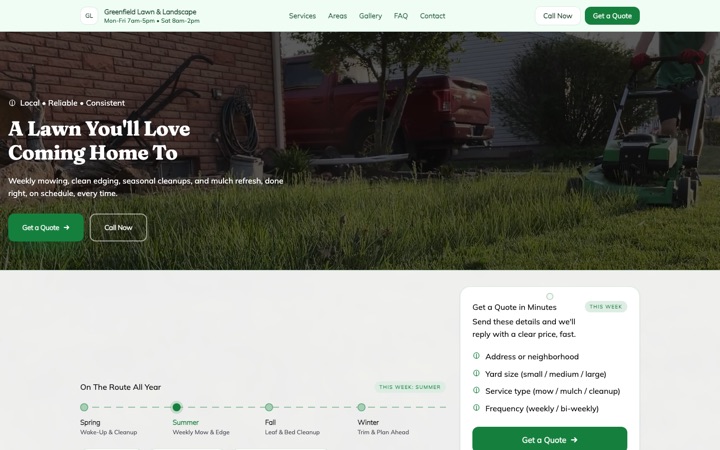
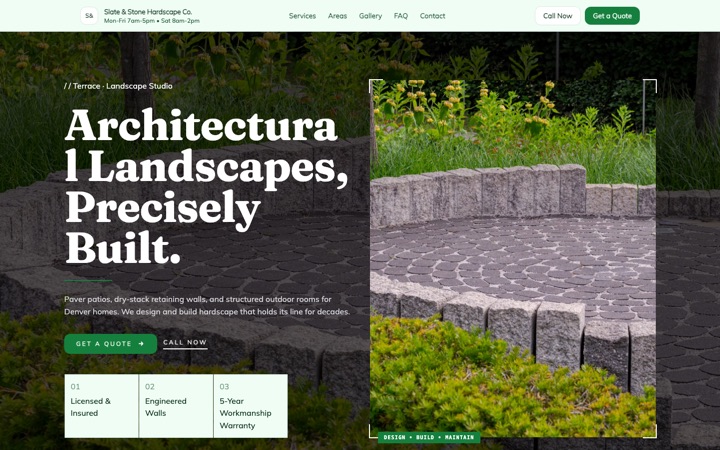
Every design below is a complete lawn & landscape website in its own right, not a color swap. Open any of them as a full live site, then switch between them later without losing a word you have written.
-
-
-


The landscaping website built to fill your route while you're on the mower
A quote form built for the way homeowners book a lawn or landscape crew, an email for every request, and a Lead Inbox that tracks each one from new to booked. Free to build and preview, and you can publish the same day you start.
Built for solo lawn-care operators, two-truck crews, full-service landscape companies, hardscape and patio specialists, irrigation pros, tree care teams and seasonal cleanup outfits. Every section, form question and button is shaped around the way people decide who to trust on their property.
- Free to build and preview
- A quote form built for landscapers
- Every request emailed to you and saved in your Lead Inbox
- A call button that stays on screen on phones
Built for landscapers. Built to book the job.
A landscaping website has two people to serve: the homeowner looking at an overgrown yard on a Sunday evening, and the owner running a packed Tuesday route who can't sit at a laptop answering inquiries between properties. This one was designed around both of them.
Less phone tag before the first visit
The page leads visitors to a quote form that sizes up the property. By the time a request reaches you, you know the yard size, the service, whether it's regular upkeep or a one-off project, how often, the kind of property and the address.
Every request lands in your email
When a homeowner sends the form, you get an email with everything they filled in and a button to call them back. There's nothing to log into to read it, so you can answer from the truck between properties.
Every request saved in your Lead Inbox
The same request is saved in your Lead Inbox. Move it from new to contacted, quoted, booked or lost, add private notes, and search by name, phone or address. When you want it in a spreadsheet, export it to CSV.
The first screen shows the whole year
Meadow opens on a season rail: spring to winter, each with one line you write about the work your crew does that season, and the current season marked. Your own photo or film sits beneath it in a plain frame, with nothing written over it.
A call button that stays on screen
On a phone, a call button stays at the bottom of the screen as visitors scroll, with a text button beside it if you want one, so a homeowner looking at your projects is one tap from calling. Every section stacks to fit a small screen.
Built for local Google searches
Your business details are marked up the way Google reads a local business, your headings name your services and your city, and every plan includes an areas page listing each town on your route, with a page of its own for your main city. The reviews and your Google Business Profile are still yours to look after.
Everything a landscaping business needs
Not a pile of features you'll never use. These are the tools that are built and working on this design today.
A quote form built for landscapers
It asks the address, the yard size, the service, whether it's regular upkeep or a one-off project, how often and the kind of property, with room for a gate code, pets or the days that suit. You can rename any question and change its options.
A frequency question that spots recurring work
Customers pick weekly, every other week, monthly, seasonal or one-time right inside the form, so you can see at a glance which requests could be a season-long contract rather than a single cut.
A season rail on the first screen
Four stops from spring to winter, each with a line about the work your crew does that season, and the current season marked. It tells a homeowner you look after the yard all year, not just the first mow.
Seasonal specials
Room for up to three offers, like a spring cleanup or fall leaf removal, which you change in the editor whenever the season turns. The section shows on your published site only once you've written your own.
Project photos or before and after
Show finished lawns, fresh mulch beds, patios and retaining walls in a photo gallery, or set before and after photos of a yard side by side, each pair with a short label. The two share one spot on the page, and you pick which shows.
Services for every season
List what you do, from weekly mowing and hedge trimming to hardscaping, irrigation and snow removal, each with a price if you want to show one. Add, remove or reorder services in the editor.
An email for every request
The email carries the name, phone, address, yard size, service, how often and any notes, with a button to call back. No app to install, nothing to log into and no waiting for a daily digest.
Lead Inbox with a five-stage pipeline
Every request is saved in your Buildrok dashboard, where you move it through new, contacted, quoted, booked and lost. Search by name, phone or address, keep private notes, export to CSV, and filter by site if you run a second brand.
The towns on your route
List every town, suburb and neighborhood you cover, so homeowners can see whether you reach them before they ask. Every plan adds an areas page and a page of its own for your main city.
Your license and insurance up front
A strip under the first screen shows your license number, your insurance, how long you've been in business and how far you travel. Each shows on your site only once you've filled it in.
Commercial grounds contracts
A separate form for HOAs, office parks and property managers asks the kind of site, its size and how often you'd visit, so a commercial lead arrives ready for a site walk.
Change anything on the page
Tap any heading, paragraph, photo, price, service or button to change it. Pick a color preset or your own colors, and switch to another landscaping design later without losing your words. No plugins and no developer.
From template to booked routes in three steps
-
Pick a landscaping design
Start with Meadow, Canopy or Terrace. Your site opens with sample services, a working quote form and the design's own palette in place, and you can switch designs later without losing your words.
-
Make it yours, live
Add your business name, services, prices, project photos, the towns you cover and your contact details. Tap anything on the page to change it, and see each change as you make it.
-
Publish and take requests
Publish when it's right. From then on, every quote request lands in your email and your Lead Inbox. Put it on your own domain for $29 a month.
The lead system that ships with every landscaping site
A good-looking site only matters if the requests reach you. Here is what happens when a homeowner finds your site and asks for an estimate.
-
The customer fills in the quote form
The form sits near the end of the page, and the buttons in the hero and along the page lead to it. It asks the address, the yard size, the service, the kind of work, how often and the kind of property.
-
You get an email
An email arrives with everything they told you, so you can call back from the next property. No app and no login.
-
The lead is filed in your Lead Inbox
The same request appears in your Lead Inbox with a five-stage pipeline (new, contacted, quoted, booked, lost). Add notes, search, and export to CSV any time.
-
You call back and track it
Move the lead along as the job does. The Lead Inbox shows how long each one waited for your first reply, so you can see how quickly you're getting back to people.
Show customers exactly what you do on a property
A clear list of every service you offer, each with a price if you want to show one. Customers can see what you do before they ever fill in the form, which means fewer quote calls about work you don't take on.
- Lawn maintenance and mowing
- Hedge and shrub trimming
- Mulching and bed maintenance
- Garden and landscape design
- Sod installation and lawn renovation
- Irrigation install and repair
- Hardscaping, patios and retaining walls
- Tree care and pruning
- Spring and fall cleanups
- Leaf cleanup and hauling
- Snow removal and salting
- One-time yard restorations
Reasons customers pick you over the cheapest crew
Landscaping is a season-long relationship: customers are letting a crew onto their property every week with mowers, blowers and chemicals. The template gives you a place to show why you're worth trusting before they pick up the phone, and the site shows only what you fill in.
- Your license number and insurance
- Years in business
- How far you travel
- The towns on your route
- Reviews from your own customers
- Before and after photos of your own yards
- Answers about pet-safe products and free estimates, in your words
- A form for commercial and HOA contracts
Stop losing routes to faster crews
Your next weekly maintenance customer is looking for a crew. Give them a site that asks about the property and puts the request in your inbox, so you can call back while they're still deciding.
What it costs
$29 a month
Or $276 a year, which is $23 a month. Building and previewing are free, with no card.
- Every section your design has, on one page
- A standard .com, .net, .org, .co, .us domain, registered in your name and renewed while you're subscribed
- Or connect a domain you already own, free
- Hosting and the security padlock
- A quote form built for your trade, with junk and bot messages blocked
- The Lead Inbox, to track every job from new to booked
- A photo gallery of your work
- A call button that stays on screen on phones
- Built for local Google searches
Canopy template questions
Is this landscaping website template really free to preview?
Yes. You can build the whole site, change your business name, services, prices and project photos, and share a preview link without a card. You pay only when it goes on your own domain, for $29 a month.
How fast can I get my landscaping website live?
As fast as you can fill in your details. Pick a design, tap any text or photo to change it, add your services and contact details, and publish. There's no code, no plugins and no developer, and you can publish the same day you start.
Does the landscaping template include a quote form?
Yes. Every Buildrok landscaping website has a quote form built for landscapers. It asks the customer's name, phone and address, the yard size, the service, whether it's regular upkeep or a one-off project, how often and the kind of property, with room for notes like a gate code. You can rename any question and change its options.
Can the form ask about weekly versus one-off work?
Yes. The form asks how often, with weekly, every other week, monthly, seasonal and one-time as the choices, and separately whether the job is regular upkeep or a one-off project, so you can spot the recurring contracts in your inbox at a glance. You can edit the options to match the way you sell your services.
Where do my landscaping leads go when someone fills out the form?
Two places at once. You get an email with the full request, and the same lead is saved in your Buildrok Lead Inbox, where you move it through new, contacted, quoted, booked or lost.
What is the Buildrok Lead Inbox?
A simple lead tracker built into Buildrok for service businesses. Every request from your site lands in one list. You move leads through a five-stage pipeline, add private notes, search by name, phone or address, filter by status or site, and export to CSV any time. It comes with the plan, so there's no extra subscription.
Will my landscaping website rank on Google?
No website can promise a ranking, but this one is built for local search from the start. Your business details are marked up the way Google reads a local business, your headings name your services and your city, the towns on your route are listed on the page, and every plan includes an areas page and a page for your main city. Pair it with a Google Business Profile that uses the same name, address and phone number, and a steady stream of reviews; those are still yours to look after.
Can I show my finished projects in a gallery?
Yes. The template has a project gallery for landscapers. Add finished lawns, mulch beds, patios, retaining walls and full installs, and let homeowners scroll through real work. If you'd rather show a yard before and after, a before-and-after section can take the gallery's place, with each pair side by side.
Is the landscaping template mobile-friendly?
Yes. It's built for phones first: a call button stays on screen as visitors scroll, the quote form is easy to fill in with a thumb, and every section stacks to fit a small screen.
Can I use this template if I do hardscaping or design, not just mowing?
Yes. The template works for lawn-care operators, full-service landscape companies, hardscape and patio specialists, irrigation pros, tree care teams, garden designers and seasonal cleanup outfits. The form already asks whether a job is regular upkeep or a one-off project, there's a separate form for commercial grounds contracts, and services, form questions and prices are all yours to change.
Can I rank in more than one town or neighborhood?
Yes, with one condition worth knowing. This design is a single page, and every plan adds an areas page listing every town on your route and a page of its own for your main city. A page of its own for each further town comes with the Local SEO Pro add-on, if you want to push beyond your home base.
How much does the landscaping website cost after the free preview?
One plan: $29 a month, or $276 a year ($23 a month) if you pay annually. It includes every section of this design on one page, your areas page and a page for your main city, hosting, the security padlock, and a new domain (.com, .net, .org, .co, .us) registered in your name and renewed while you're subscribed, or connect one you already own for free. Cancel any time.
Every service business template
Designs built for plumbers, cleaners, electricians, movers, barbers and more.
- Cleaning website template
- Mobile detailing website template
- Landscaping website template
- HVAC website template
- Contractor website template
- Food truck website template
- Moving company website template
- Barber shop website template
- Electrician website template
- Plumber website template
- Premium cleaning website template
- Modern cleaning website template
- Cleaning website template house notes
- Premium moving company website template
- Mobile notary website template
- Roofing website template
- Cottage food bakery website template
- Mobile detailing website template window sticker
- HVAC website template gauge
- Cottage food bakery website template linen
- Cottage food bakery website template pantry
- Cottage food bakery website template rise
- Mobile detailing website template chrome
Your landscaping website, live the same day.
Pick a design, change anything you want and publish when it's right. Free to build and preview with no card. On your own domain it's $29 a month, and you can cancel any time.