

Flame
Food truck website template
A done-for-you food truck website with a live menu, a weekly schedule, your hours and a map, an Instagram-style gallery, a catering inquiry form, and a built-in Lead Inbox.
Free to build and publish, no card required. $29 a month puts it on your own domain, with the domain included.
- Your menu with prices and dietary tags
- Your hours and a map, and a weekly schedule you can switch on
- A photo gallery
- A catering form that asks the date, headcount and kind of event
- An email for every catering request
- The Lead Inbox, from new to booked
- A text or call button that stays on screen on phones
- Change any word or photo by tapping it

Food truck design
Flame
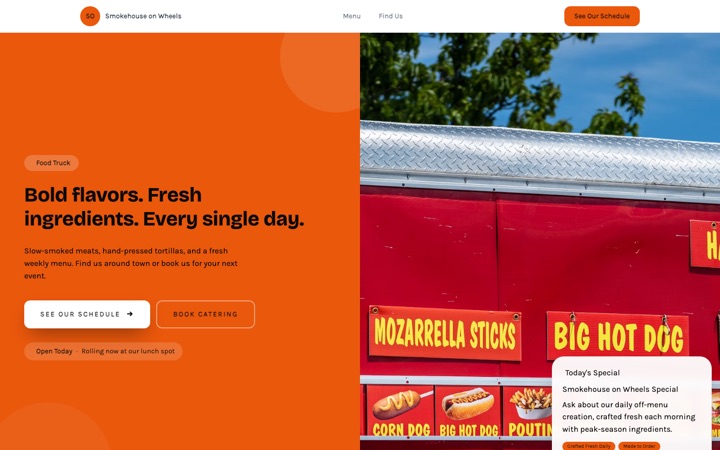
BBQ-joint poster typography. Built for smoke, grills and anything where the food is loud.
- Your menu with prices and dietary tags
- A weekly schedule, if you move around
- Your hours and a map
- A catering form built for events
- A photo gallery
- Order online links
Done for you
We'll build your food truck website in 2 business days, with your week's stops on it.
The menu, where you are parked, and a catering form. The three things people come to the site for.
$99 today, $400 on approval, then $79/month starting 30 days after go-live. 30-day money-back guarantee from the day it goes live, no reason needed, and you keep the domain. Registration and the first year are included.
Rather build it yourself? Start free. Either way you end up in the same editor, with the same Lead Inbox; done for you means the first version is built for you, and we keep changing it on the $79/month managed plan.
-
I move. The site has to keep up.
A weekly schedule of where you will be parked, which you can change from your phone. Regulars check it; the site is built so that checking it is worth it.
-
Catering is the real money.
A catering inquiry form that asks for the date, the headcount and the kind of event, so the office party and the wedding reach you without scrolling a menu.
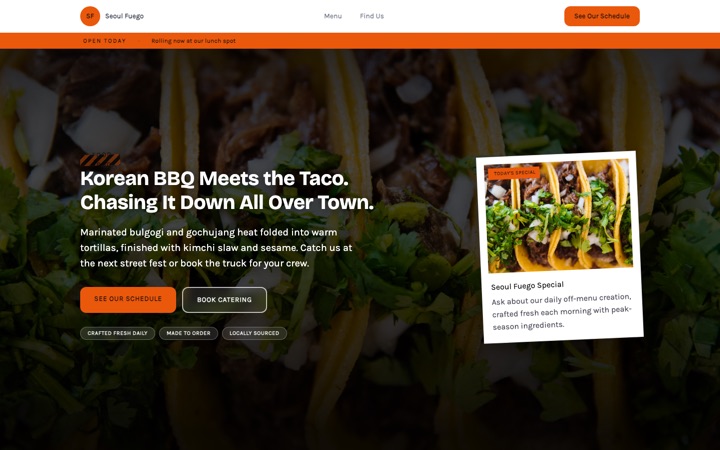
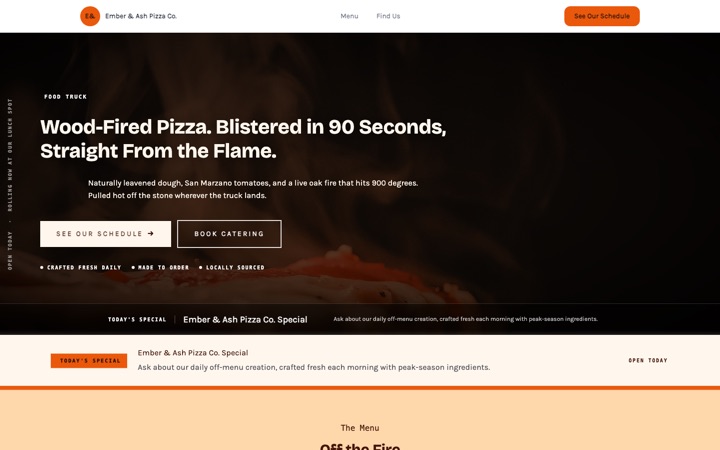
Three food truck website templates. One editor.
Every design below is a complete food truck website in its own right, not a color swap. Open any of them as a full live site, then switch between them later without losing a word you have written.
-
-
-


The food truck website that fills your line and books your catering
A food truck website with your menu and prices, your hours and a map, a weekly schedule to switch on if you move around, a photo gallery, and a catering form that asks the date, headcount and budget, so wedding and office inquiries arrive ready to quote while you're still at the window.
Built for taco trucks, BBQ pits, smash burger rigs, pizza trailers, dessert vans, coffee carts, halal carts, vegan pop-ups, and weekend market vendors. Every section, menu row and form field is shaped around how a hungry regular finds you on a lunch break and how a couple picks the truck for their wedding.
- Free to build and preview
- Menu, hours and map on one page
- Catering requests in your email and Lead Inbox
- Built for phones first
Built for food trucks. Built to fill the calendar.
Plenty of food truck websites are an Instagram link in a Linktree. This one was designed around two real people: the regular at 11:45am trying to figure out if you're at the brewery or the office park today, and the event planner with a catering budget who needs to know if you can do 80 guests on a Saturday in June.
Regulars know where to find you
The find-us section shows your hours and a map of the spot you set. If you move around, switch on the weekly schedule and it lists each day, the hours and where you'll be parked. Update it before you roll out, and regulars checking on their lunch break know where to walk.
Every catering request comes to your email
When an event planner sends the form, you get an email with the event date, headcount, type of event, how you'd serve and the budget. Reply between rushes, before they've emailed three other trucks.
Every lead saved inside Buildrok
The same request lands in your Lead Inbox. Move it from new to contacted, quoted, booked or lost, add notes about the menu they want, and export the list to CSV, so a wedding inquiry doesn't get lost between Friday and Saturday lunch.
Looks as good as the food
Three designs, Market, Streetside and Flame, each built around big food photography, with a gallery you can lay out as a mosaic, a grid or a slideshow. It makes a smash burger or a birria taco look as good on the page as it does on the griddle.
A text button that stays on screen
On phones, a text button sits at the bottom of every screen, so a regular or a planner can reach you without scrolling back up. Add a call button beside it if you'd rather take calls, and the menu stays easy to read on a small screen.
Local search basics built in
Your business details are marked up for Google as a local business, and the page title and description are yours to edit. Showing up for 'taco truck near me' or 'food truck catering in [your city]' also takes reviews and a Google Business Profile, which are yours to look after.
Everything a food truck actually needs
Not a kitchen sink of features you will never use. The sections that fill your line at lunch and your calendar with catering events, each one checked against what the template really does.
Your menu with prices and dietary tags
List each item with its category, price and description, and add dietary tags such as vegan, gluten-free or spicy. Change an item or take it off when it sells out, and put today's special on the card in the hero.
A weekly schedule, if you move around
Switch it on and it shows Monday to Sunday, with the hours and where you'll be parked each day, plus links to your Instagram and Facebook for the stops you add at short notice. It starts switched off, because plenty of trucks park in one place.
Your hours and a map
The find-us section shows your hours, your phone and email, and a map of the spot you set. Change the spot in the editor when you move, and the map follows.
A catering form built for events
It asks the event date, the headcount, the type of event (wedding, corporate, private party, festival), how you'd serve and the budget, with room for the details. Switch the catering questions off and it becomes a plain contact form.
A photo gallery
A gallery built to make food look like food, as a mosaic, a grid, a slideshow or several other layouts, with a caption on each photo if you want one. Upload straight from your phone.
Order online links
Already take orders through Uber Eats, DoorDash, Grubhub or Toast? Add the links and an order online section sends hungry regulars there. It stays hidden until you add one.
An email for every catering request
The email carries the name, the contact details, the event date, headcount, type of event, service style and budget. Tap to call, tap to reply. No app to install, no login, nothing to check while you're cooking.
The Lead Inbox
Every catering request is saved in your Buildrok dashboard. Move it through new, contacted, quoted, booked and lost, set a priority, keep private notes, search by name or phone, and export to CSV, so a wedding inquiry never slips between Friday and Saturday lunch.
Permit, insurance and years on the road
A credentials strip for your permit number, your insurance, years on the road and how far you'll travel for an event, plus reviews you add or bring in from Google. Each row shows once you fill it in.
Edit anything on the page
Tap any heading, menu item, price, photo, schedule row or button to change it. Pick a color preset or use your own colors, and switch between Market, Streetside and Flame without losing your words. No plugins, no developer.
From template to booked catering in three steps
-
Pick the food truck template
Click 'Preview my food truck site free'. Your site opens with a sample menu, a working catering form and the Market design already in place.
-
Make it yours, live
Add your truck name, menu, prices, dietary tags, photos, weekly schedule and contact details. Tap anything on the page to change it, and every change saves as you go.
-
Go live and catch every lead
Publish it. From then on every catering request lands in your email and your Buildrok Lead Inbox, and regulars can check where to find you on your site. Put it on your own domain when you're ready.
The lead system that ships with every food truck site
A good-looking site is no use if the catering request gets lost between the lunch rush and Sunday market. Here is what happens when an event planner finds your site and asks about catering.
-
Event planner fills in the catering form
Buttons in the hero and the find-us section lead to it. It asks the right questions for an event quote: the event date, headcount, type of event, how you'd serve and the budget, with room for menu preferences.
-
You get an email
When they press send, an email arrives with every answer they gave, so you can call back from the truck window. No app, no login, nothing to check between rushes.
-
The lead is filed in your Buildrok inbox
At the same time, the request appears in your Lead Inbox, where you move it from new to contacted, quoted, booked or lost, add notes about the menu they want, and export to CSV any time.
-
You reply between rushes and win the event
You know the date, the headcount and the budget before you call, so the first conversation is about the menu rather than twenty questions. The template is built to make that reply the easiest thing you do between services.
Show customers exactly what you serve
A menu layout for every dish on the truck, with prices, descriptions and dietary tags. Customers know what they want before they reach the window, and event planners can see at a glance whether your menu fits their crowd.
- Daily menu with prices
- Weekend specials and limited drops
- Vegan and vegetarian options
- Gluten-free and dairy-free options
- Halal and kosher options
- Kids menu
- Drinks and sides
- Catering packages (per-head and buffet)
- Wedding catering
- Corporate lunch catering
- Private party and birthday catering
- Festival and market bookings
Reasons customers and planners pick your truck
Street food is a vibe and a gamble at the same time. Customers want to know the food is good and the truck is legit. Event planners want to know you'll actually show up at 11am on the wedding day. The template gives you a place to show both, and each of these appears once you fill it in.
- Your permit number, in the credentials strip
- Your insurance for public and private events, in your own words
- Years on the road, counted from the year you started
- How far you'll travel for an event
- Reviews you add, or bring in from Google
- Your story, in the about section
- Catering minimums and what's included, in your FAQ
- Links to your Instagram and Facebook
- Where to order online, once you add the link
Stop losing catering bookings to faster trucks
Somebody near you is looking for a food truck for a wedding right now. Give them a site that shows your menu, asks the questions you need answered, and puts the request in your email and your Lead Inbox before your competitor wipes down their grill.
What it costs
$29 a month
Or $276 a year, which is $23 a month. Building and previewing are free, with no card.
- Every section your design has, on one page
- A standard .com, .net, .org, .co, .us domain, registered in your name and renewed while you're subscribed
- Or connect a domain you already own, free
- Hosting and the security padlock
- A quote form built for your trade, with junk and bot messages blocked
- The Lead Inbox, to track every job from new to booked
- A photo gallery of your work
- A call button that stays on screen on phones
- Built for local Google searches
Flame template questions
Is this food truck website template really free to preview?
Yes. You can preview the full food truck template, edit your truck name, menu, prices, photos, schedule and content, and share a preview link without entering any payment details. You only pay when you put it on your own domain.
How fast can I get my food truck website live?
The same day, if you build it yourself. Pick a design, tap any text or photo to change it, add your menu, hours and photos, then publish. How long it takes depends on how long your menu is. There's no code, no plugins and no developer.
Can I show my menu with prices and dietary tags?
Yes. The menu lists each item with its category, price and description, and you can add dietary tags such as vegan, vegetarian, gluten-free, dairy-free, halal or spicy. Change an item or take it off when it sells out.
Can I show where the truck is today?
Yes, a week at a time. Switch on the weekly schedule and it lists each day, the hours and where you'll be parked, and the find-us section shows your hours and a map of the spot you set. Change it in the editor before you roll out; it doesn't follow the truck's location by itself.
Where do my catering leads go when someone fills out the form?
Two places at the same time. You get an email with the event details, and the same request is saved in your Buildrok Lead Inbox, where you move it through new, contacted, quoted, booked or lost. No more catering inquiries lost in Instagram DMs between rushes.
What is the Buildrok Lead Inbox?
A simple place to track the jobs that come in from your site. Every catering request lands in one list. You move each one from new to contacted, quoted, booked or lost, set a priority, add notes about the menu they want, search by name or phone, and export to CSV any time. It comes with the plan, with no spreadsheet and no extra subscription.
Will my food truck website rank on Google?
It's built for local Google searches from the start: your business is marked up as a local business, and the page title and description are yours to edit. A site shows up in Google once it's on your own domain. Ranking for 'taco truck near me' or 'food truck catering in [your city]' also takes reviews and a Google Business Profile, which are yours to look after.
Can I add an Instagram-style photo gallery?
Yes. The gallery can be a mosaic, a grid, a slideshow or one of several other layouts, and each photo can carry a caption. Upload straight from your phone. For a planner deciding between trucks, photos of the food say more than any description.
Is the food truck template mobile-friendly?
Yes. It's built for phones first, with a text button that stays on screen (add a call button too if you'd rather take calls) and a menu that's easy to read on a small screen. Somebody checking where you're parked is probably on the sidewalk with a phone, so that's the screen it's designed around.
Can I use this template if I run a pop-up, market stall, or coffee cart?
Yes. The template works for taco trucks, BBQ pits, smash burger rigs, pizza trailers, dessert vans, coffee carts, halal carts, vegan pop-ups, and weekend market vendors. The menu, the schedule, the catering form's options and the credentials are all yours to change.
Can I take pre-orders or accept catering deposits?
Not through the site itself. There's an order online section that links to your Uber Eats, DoorDash, Grubhub or Toast page, and it shows only once you add a link. The catering form collects every event detail; take the deposit through whatever you already use to invoice.
How much does the food truck website cost after the free preview?
One plan, $29 a month or $276 a year. A food truck site is one page by design: every section, from the menu and find-us section to the gallery and catering form, in one scroll. Hosting and the security padlock are included, and a new domain (.com, .net, .org, .co, .us) is registered in your name while you're subscribed, or you can connect one you already own for free. Cancel any time.
Every service business template
Designs built for plumbers, cleaners, electricians, movers, barbers and more.
- Cleaning website template
- Mobile detailing website template
- Landscaping website template
- HVAC website template
- Contractor website template
- Food truck website template
- Moving company website template
- Barber shop website template
- Electrician website template
- Plumber website template
- Premium cleaning website template
- Modern cleaning website template
- Cleaning website template house notes
- Premium moving company website template
- Mobile notary website template
- Roofing website template
- Cottage food bakery website template
- Mobile detailing website template window sticker
- HVAC website template gauge
- Cottage food bakery website template linen
- Cottage food bakery website template pantry
- Cottage food bakery website template rise
- Mobile detailing website template chrome
Your food truck website, live today.
Pick a design, change anything you want, and publish when it's right. Free to build and preview with no card. The plan is $29 a month once it's on your own domain, and you can cancel any time.